Do you use pinned tabs in Chrome as a way to keep up with your email and/or social networking sites – like Facebook, Twitter, and LinkedIn? If so, you may find it pretty inconvenient that notification counts are not automatically displayed on these pinned tabs.

Imagine how much easier things would be if you could display notification counts for messages and unread items on your pinned tabs. Luckily, you don’t have to imagine anymore because the Notifycon extension is here to save you.

Notifycon is a simple Chrome extension that can display notification counts on your pinned tabs in Chrome. It’s very easy-to-use and works right out of the box.

Here’s how to use Notifycon.

1. Install the Notifycon Chrome extension from the Chrome Web Store.

2. Once installed, you’ll see the new icon on your browser toolbar. There aren’t any options for the extension, so there’s nothing to customize.

The Notifycon icon on the browser toolbar.

3. When you click on Notifycon’s icon, you’ll see a small pop-up letting you know that you must pin the tab in order for the extension to work.
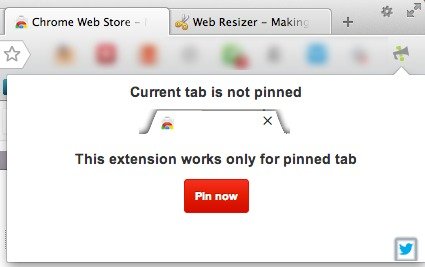
You must pin the tab for Notifycon to work.

4. Click on the red “pin now” button in the above window to pin the tab. Alternatively, you can right-click on the tab (in the browser toolbar) and then select the “pin tab” option. You can also unpin tabs in the same manner (both methods).
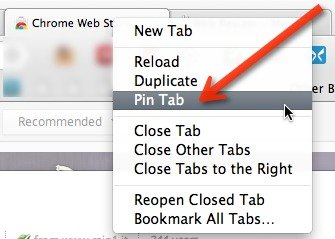
You can also right-click on a tab to pin it.

5. Once pinned, you will see the notification count appear (if supported) for new and/or unread items. The extension is not very clear regarding the supported sites, so you’ll have to test it out for yourself. You can see from the image that Gmail, Yahoo Mail, Facebook, Twitter, LinkedIn, and Google Reader are all supported.

Before and after installation of Notifycon extension.

Note: If you have Gmail Lab’s favicon unread count enabled, you may want to disable it while using Notifycon.

With Notifycon, you can save tab space on your browser without missing a thing. Now your notifications are in clear sight and you’ll immediately know about any new messages and notifications.

Edit Google Drive Videos Inside Chrome With WeVideo

What if you left your laptop at home and there is an urgent need to edit a video that you saved in Google Drive? Thankfully you can make use of WeVideo to edit the video directly in Google Drive.

Speed Dial with Full Online Sync For Firefox

Even being a veteran browser, Firefox has not been able to implement the Speed Dial function well. That’s where FVD Speed Dial comes into play. This fully functional Firefox addon fundamentally changes the Speed Dial feature to what it should have been all along.

What You Need to Know About Future Web Standards (That are Making the Internet Better)

The Internet started 40 years ago and many things have changed since then. Let’s take a look at the future web standards and how they improve the Internet.

Mastering Keyword Searches for Better Productivity in Firefox

Mozilla don’t call their address bar the “Awesome Bar” for nothing. Master the keyword searches in Firefox and turn the Awesome Bar into a productive tool.

How to Add Confirmation Message Before Publishing a Post in WordPress

When you click the Publish button in WordPress, it turns the article live without prompting. To overcome this, you can get it to show a confirmation message before publishing.

3 Things to Do to Make Your Internet Life More Secure

The Internet is full of hackers and thieves, all wanting to get into your accounts. Here are 3 things you should do to make your internet life more secure.

How to Open Multiple Links in Firefox

If you always have a set of URLs that you want to load whenever you run the browser, Multiopen for Firefox allows you to open multiple links quickly and easily.

Why YouTube Added Support for 60 Frames Per Second

YouTube has added for videos to stream at 60 frames per second as opposed to its usual 30. Is this something we should be excited about?

Three Ways To Educate Yourself Right Now About Internet Censorship

The Internet isn’t free, as much as you like it to be. This article examines 3 of the best online resources where you can learn about Internet censorship.

How to Restore the Old Search UI to Firefox

Firefox 34 changed the look of the search box. For those who are not used to the new look, here’s how you can restore the old search UI in Firefox.

How to Submit WordPress Site for Bing Indexing

If you want to get your site indexed in Bing search results, here is how you can submit your WordPress site to Bing and have it index your site.

Test Your Website in Various Mobile Devices Without Physically Owning the Devices

Google Chrome comes with a nifty tool that allows you to test how your website render in various mobile device. Here is how you can use the device mode in Chrome.