Do you often open a lot of tabs in Google Chrome, just to leave most of them untouched for hours? If you’re like, me, you probably use tabs as a way to save Web pages that you want to go back to. Keeping them open helps you remember that you need to go back to them.

While this may be one of your personal productivity techniques for browsing the Web, it’s not always the smartest method. The longer you keep a tab open in Chrome, the more it eats away at your computer’s memory. Before you know it, your browser starts to move really slow and may even become responsive.

Luckily, there’s a simple way to avoid this huge headache, thanks to The Great Suspender extension for Chrome. With this extension, you can suspend a tab until you’re ready to use it, which in turn helps to reduce Chrome’s memory footprint. Here’s how to use it.

1. Install The Great Suspender Chrome extension.

2. Once installed, click on the browser icon and go down to Settings.
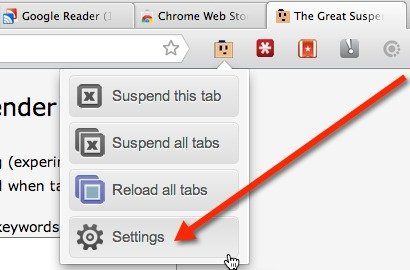
Go to The Great Suspender's Settings

3. On the Settings page you can choose to: turn on screen capturing, automatically unsuspend a tab when it gains focus, whitelist keywords or Web pages, view or clear your suspended tab history, and choose a length of inactivity that needs to go by before a tab suspend automatically.
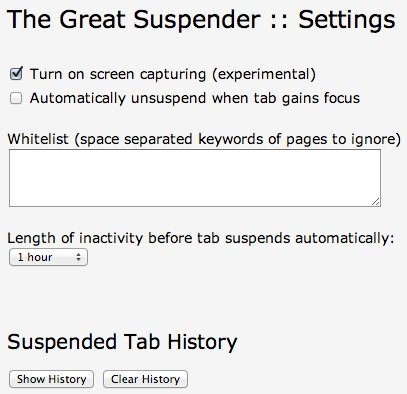
Customize the Settings for The Great Suspsender.

Everything is pretty self-explanatory, but if you’re wondering about the screen capture feature, it’s experimental. It’s done using a script called html2canvas. The script will take a screenshot of your suspended page and display it on the tab. This helps you to remember what was on the page.

4. When you’re done, you’re ready to suspend your tabs. To do so, click on the browser icon and click on suspend this tab or suspend all tabs. Once a tab is suspended, you’ll see a yellow bar at the top of the page along with the name of the website, URL, and favicon. If you’ve enabled screen capturing, you’ll see the screenshot below the yellow bar.

5. To unsuspend the tab, click the yellow bar to reload the page. If you’ve suspended more than one tab, you can choose the “Reload All Tabs” option from the browser icon to unsuspend them all at once.

As you can see, The Great Suspender is an invaluable Chrome extension. Not only is it lightweight and easy-to-use, it also improves your browsing experience.

What is Bitcoin And How You Can Utilize It Online

Do you know that the Internet actually has its own currency. Since 2009, we can pay and get paid using Internet’s own currency – Bitcoin.

How Is Simple Different From Traditional Banking?

Simple is an online service that seeks to change the way people manage their money, but just how is it different from traditional banking?

How to Share Clipboard Items Between Chrome Browsers

For those of us who use multiple computers for one reason or another, being able to copy from one of them to another is extremely beneficial. Clipboard Sync for Google Chrome provides a good solution for users to copy and paste information between the browser from PC to PC.

9 Ways to Make Better Use of Gmail Filters

Gmail filters is a good way for you to organize your inbox without you doing the manual work. Here are a few ways that you can make good use of Gmail fliters.

6 Alternative Uses of WordPress, Other Than Blogging

You can be sure of one thing, Wordpress: it’s not just for blogs anymore. Here are 6 alternative uses of Wordpress that aren’t blogging.

How to Know the Word Count of Any Text in Firefox

For those who need to keep track of word count, Word Count Tool for Firefox allows you to easily find out the word/character count of highlighted text in the browser.

Does Disabling DHCP on Your Router Really Help Your Security?

Are you confused on what DHCP is and if you should disable it to make your network more secure? You won’t be after reading this.

Use History Eraser to Quickly Wipe Your History in Chrome

Are you worrying about your privacy when surfing the web? History Eraser can clean up your Chrome browsing history with a single click. Check it out here.

What is Password Hashing (and How Does It Work)?

If there was a breach and your encrypted password was leaked. Is your account at risk? Read on to find out how password hashing work and how it affects you.

A Beginner’s Guide to Not Being Compromised on the Internet

You may understand what social engineering is, but are not sure how to properly defence against it. Here are a couple of advices for you.

5 Cool IFTTT Recipes to Automate Your Social Life

IFTTT has a bunch of other cool and super useful social media recipes. Check out these 5 cool IFTTT recipes to automate your social life.

How to Get Cheaper Price Notifications When Shopping Within Firefox

If you’re looking for an easier way to know which online stores offer a product for a lower price, Ciuvo Price Comparison can help you do just that.