As we all know, Facebook is never a privacy-friendly place, and it never fails to provoke its users with frequent changes that disregard your privacy. Earlier this June, Facebook stated that its plans to share any and all the data it has collected by tracking your app and browsing history with the third parties and advertisers to show you more relevant ads. So, who is affected by this change? Well, almost everyone who has logged into their Facebook accounts, be it today, last week or last month.

Of course, Facebook has stated several times that they have given users more control over the ads they see, and they also stated that they won’t share any personally identifiable information. But that doesn’t mean they have given you any control over what data Facebook can collect from you or what it will do with the collected data. Previously, Facebook used to serve the ads based on post shares, page likes, post likes, information submitted by the user, and any other data in your Facebook account. But now, Facebook just wants to peek into your app and web browsing history. If you don’t like these changes or if you wish to opt out of this feature, here is how you can do it.

You Can Customize The Ads

With the recent changes, users can now click on the top right side corner of an ad and can tell Facebook if that displayed ad is relevant to them or not, and users can know why they are seeing that ad in the first place. Using this new feature, they can also tell Facebook which ads they would prefer to see. This greatly increases the relevancy of the ads they see. You can learn more about these changes from Facebook’s newsroom.
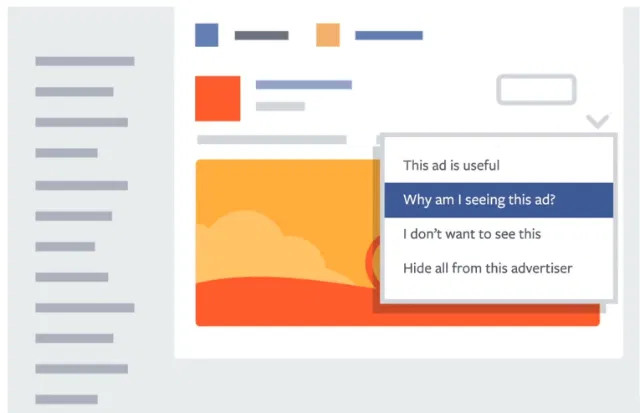
opt-out-of-facebook-ads-why-am-i-seeing-this-ad

Opt Out of Facebook Sharing Your App and Browsing Data

The good thing about this change introduced by Facebook is that you can opt out of it on demand. If you don’t want to share your app and browsing data with third parties, head to Digital Advertising Alliance. Here under the “Companies Customizing Ads For Your Browser” tab, select the check box “Facebook Inc” and click on the “submit your choices” button. Of course, if you want, you can also select any other website(s) that you want to opt out of from interest based ads.
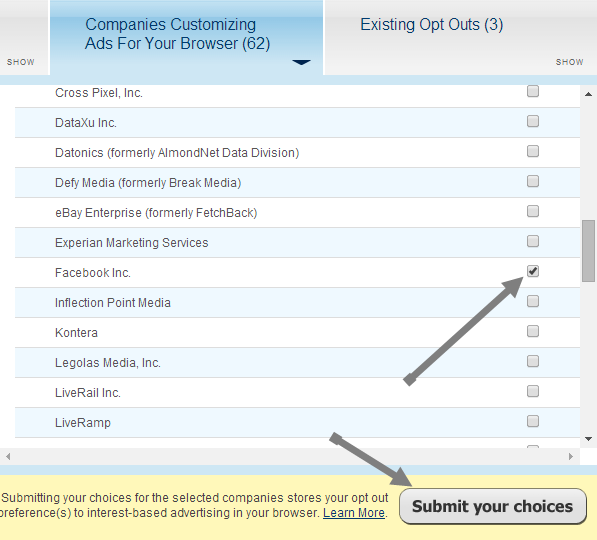
opt-out-of-facebook-ads-select-facebook

As soon as you opt out of this feature, Facebook won’t sell or share your app or browsing history data with the third party advertising companies. That said, it doesn’t stop Facebook from collecting your app or browsing history.

However, if you are using a Facebook app on smartphones like Android, then you can opt out of interest-based ads with the instructions here.

Conclusion

It does seem like Facebook stepped a little over the boundaries but giving users a choice to opt out of these interest-based ads is welcoming. So what do you think of these new changes? Do these changes stop you from using Facebook or do you love these changes as you get to receive more relevant ads? Do comment below with your thoughts.

How To Open Multiple Links in Chrome

You might come across a webpage with several links that you want to check them out. If you’re looking for a fast, efficient way to open links in the fastest way possible, then LinkClump might just help you with that.

How To Sign Documents From Gmail

What do you do when you receive a document that need to be signed? You will have to print it out, sign it and rescan it before you can send it back. HelloSign allows you to sign a document sent to your Gmail address and sign it from there.

How Is Simple Different From Traditional Banking?

Simple is an online service that seeks to change the way people manage their money, but just how is it different from traditional banking?

What Is “UTM_Source” And Should You Be Worried?

You may have seen URLs with a long string attached to the end of the link that looks something like this: “utm_source=facebook&utm_medium=fanpage&utm_campaign=new+article&wa_ibsrc=fanpage.” Should you be worried about the implications of this? We’ll have a look at what UTM is and answer any question you might have on this subject.

4 Ways to Embed and Email Web Pages to Your Friends

If you want to email web pages to friends, you can either send them the URL or use any of these 4 ways to embed the web page directly in the email.

How to Check Your Network Connection With Chrome Connectivity Diagnostics

If you need a simple and easy-to-use tool to check your network connection, Chrome Connectivity Diagnostics by Google is the best tool you can find.

What Is the OpenSSL Heartbleed Bug and Why Should You Care?

Things just don’t work the way they should in the Internet. Here are some things you should know about the OpenSSL “Heartbleed” bug and how it affects you.

Using the New Microsoft Office App in Chrome

Following up to its revamp of the office web apps, Microsoft released a Chrome extension that allows you to use Office in Chrome browser. Let’s check it out.

Use Rublon to Add Automatic Two-Factor Authentication to WordPress

Rublon is a plugin that implements two factor authentication in WordPress, without you having to do the additional authentication step. Let see how it works.

Syncthing: An Open Source Alternative for Dropbox and BitTorrent Sync

If you want to keep your files safe while synchronizing them between computers, Syncthing is a good alternative for Dropbox that you can use.

Restore Firefox’s Older “Strata” Theme with Greater Efficiency Than Before

For those who dislike the new Firefox “Australis” theme, you can install the “Classic Theme Restorer” addon to restore the popular Strata theme. Here is how it works.

How to Change WordPress Permalink Structure

Do you want to change your website URL structure? Here is how to properly change your WordPress permalink structure and URL redirect.