Mozilla has recently introduced a drastic change to the Firefox user interface, with an all-new theme that is more similar to Chrome. Known as ‘Australis’, the new design has attracted criticism for its limited customization compared to the older “Strata” theme it replaces, as well as the amount of screen space it takes up. Thanks to the open source and extensible nature of the Firefox web browser, an addon has been created to restore the older UI once again.
The addon can be found on Mozilla’s website as “Classic Theme Restorer (Customize Australis)“, though for the purposes of this article, we shall refer to it only as Classic Theme Restorer. Follow the steps below to return to the familiar Strata design, but to still make the most of the screen real estate and making it easier to find the current tab.
1. Install Classic Theme Restorer, then restart the browser.
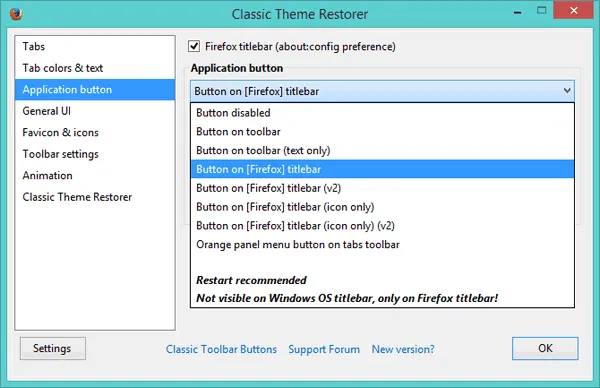
2. Go to the addons window by holding “Ctrl + Shift + A,” then clicking the “Options” button alongside its entry, or click the Firefox button and mouse over the arrow beside “Options.” By default, the extension restores the standard Strata theme, though more efficient use of screen space can be made with its options.
3. Click the “Max-width” option and change it to 180px. This will shrink the size of the tabs, meaning you can fit more tabs on screen without having to scroll. 150px or 180px is optimal, as it is still possible to read the text on the tabs.
4. Click the “Min-width” option and change it to 48px. When you have an extremely large number of tabs open, they will shrink to this size before Firefox will add buttons to move along the row of tabs. If this is not desirable, leave it as default or increase it to introduce the scrolling options more quickly.
5. Enable “Small Buttons on Navigation Toolbar” on the right; this will shrink the back and forward buttons, freeing up more screen real estate.
6. Change the application button to “Button on Firefox titlebar (icon only),” or “Button disabled” if you really want to use all the screen space. Changing the colour is entirely optional.
7. Look at the “Custom Colors” tab, and adjust it until it suits your preference. If you will be using a large number of tabs, it may be worth adding a background or bold text to the currently-active tab or all tabs that are inactive.
8. Optional: Install the “Downloads Window” extension to bring up a standalone Downloads window instead of the Library window to further replicate the Strata interface.
There are many further adjustments that can be made in the settings, whether to make elements of the browser more visible or to simply customize its appearance. However, these elements do not relate to compacting the user interface to put more focus on the webpages.
Even more heavily compressed themes can be downloaded, such as Classic Compact. However, these do not aim to replicate or even relate to the older Strata theme, and may not have the same level of familiarity, despite taking up even less space.
We have previously shown you how to tweak Firefox’s appearance, though as the name Stratiform suggests, it too was intended to take advantage of the older design language Mozilla had followed.