We have shown you several ways to create QR code, and most of them require you to visit a website or download a software. For Google Documents (aka. Google Drive) user, here is a quick way you can create QR code.

1. Create a new Spreadsheet in Google Drive.

2. In Column A, enter the content that you want to embed in the QR code. It can be a URL, a word, sentence, or paragraph, a contact number.

3. In the respective cell in Column B, paste in the following forumla:

=image("https://chart.googleapis.com/chart?chs=150x150&cht=qr&chl=" & A1)

You can change the 150×150 value to set the QR code size. Also, change the “A1” value to the cell where it will grab the content to embed.

This is what you will see:
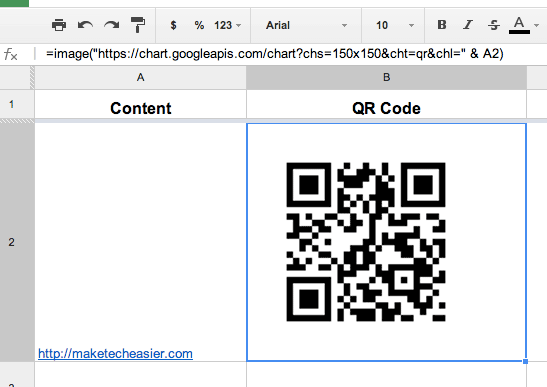
google-drive-qr-code

From here, you can take a screenshot of your desktop to save the QR code.

Also read: How to Scan QR Codes From an Image on Mobile

How To Open Multiple Links in Chrome

You might come across a webpage with several links that you want to check them out. If you’re looking for a fast, efficient way to open links in the fastest way possible, then LinkClump might just help you with that.

How to Share Clipboard Items Between Chrome Browsers

For those of us who use multiple computers for one reason or another, being able to copy from one of them to another is extremely beneficial. Clipboard Sync for Google Chrome provides a good solution for users to copy and paste information between the browser from PC to PC.

How to Fix Foreign Characters Not Showing Up issue In WordPress

If you enter foreign character in WordPress, but only see question marks (???) showing up, here is the fix for this issue without losing any data.

Make Mobile Firefox Always Runs in Desktop Mode

If you are using Firefox on a tablet, you may want to switch it to run in Desktop mode by default so websites will always load the desktop version.

How to Check Your Network Connection With Chrome Connectivity Diagnostics

If you need a simple and easy-to-use tool to check your network connection, Chrome Connectivity Diagnostics by Google is the best tool you can find.

Does Disabling DHCP on Your Router Really Help Your Security?

Are you confused on what DHCP is and if you should disable it to make your network more secure? You won’t be after reading this.

Mastering Keyword Searches for Better Productivity in Firefox

Mozilla don’t call their address bar the “Awesome Bar” for nothing. Master the keyword searches in Firefox and turn the Awesome Bar into a productive tool.

What is Password Hashing (and How Does It Work)?

If there was a breach and your encrypted password was leaked. Is your account at risk? Read on to find out how password hashing work and how it affects you.

Three Free Fonts to Spice Up Courier

Courier New is the most popular variant of the monospace typeface. Here are 3 free versions of Courier to spice up your working environment right now.

How to Get Rid of the Stickers in Comments on Facebook

Facebook added the sticker feature in its comments section. For those who dislike it, you can disable stickers in Facebook comments in Chrome and Firefox.

How to Clone and Migrate WordPress Sites the Easy Way

Migrating your WordPress site? Duplicator allows you to easily clone and migrate WordPress sites without messing with a whole lot of complicated settings.

Test Your Website in Various Mobile Devices Without Physically Owning the Devices

Google Chrome comes with a nifty tool that allows you to test how your website render in various mobile device. Here is how you can use the device mode in Chrome.