The term “end-to-end” is being thrown around like candy. Whether you’re a business owner or a consumer, you’ve seen the words “end-to-end” used to describe encryption, networking, and several other technology-related subjects. The problem is that the companies touting their products’ “end-to-end” capabilities don’t offer much of an explanation as to what this term actually means. Instead, they use it as marketing fluff. It’s time we change that and show you what the end-to-end principle is, how it applies to encryption, and why it’s important.
The End-to-End Networking Principle
As the term’s wording suggests, “end-to-end” can be explained very simply by describing it as a principle of eliminating intermediary processes. In other words, end-to-end systems try to travel the path of least resistance to deliver information faster. When you send a packet on the internet, your router sends the data to another router, which forwards it to another router, and so on and so forth until the data reaches its destination.
End-to-end transactions ensure that data packets jump through as few hoops as possible to get to their final destination, making the connection faster and more reliable.
End-to-End Encryption
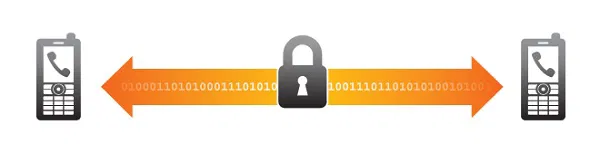
So, what does the term “end-to-end” have to do with encryption? Unlike the networking principle, end-to-end encryption has little to do with completing the process faster.
Instead, end-to-end encryption refers to who can see your data. Let’s put it this way: When you send encrypted information, your computer already sends the unencrypted data somewhere to be encrypted. In between the two points, someone can snoop in and see what you’re sending. This is often the case in Wi-Fi connections, where your device broadcasts everything it sends on an open radio signal. This encryption is practically useless in such a connected and Wi-Fi-reliant world.
With end-to-end encryption, your computer encrypts the data before ever sending it anywhere. The moment it leaves whatever device you’re using, it’s already a bunch of gibberish no one can read! It’s not until the data reaches its final destination that it is decrypted and read. Yahoo started introducing this concept to their emails in August 2014. Google has done this for Gmail in June the same year.
End-to-end encryption ensures that nothing ever leaves your computer without first being transformed into complete unreadable gibberish that hackers won’t be able to decipher.
What Do You Do With Everything Else?
There are few applications you can use that allow you to actually use end-to-end encryption. When you log in to other apps through a public Wi-Fi network, at least some of the information you send will be unencrypted and visible to everyone who is listening. This will allow them to do unspeakable things to your accounts, no matter how strong your passwords are. Since not every application is using end-to-end encryption, I highly suggest that you use a virtual private network that will route everything you send via a completely remote and locked-down network.
If you have any further questions about end-to-end encryption, be sure to leave a comment below!