If you have switched web host, or changed the database for your WordPress blog, you might encounter an issue where foreign characters are not showing up properly in your site. Instead of the foreign characters, you will see plenty of question marks (???) in its place. In this article, we will show you how to fix this problem and show proper language without losing any data.
What is character encoding?
Before going to the causes and solutions to this problem, we need to be clear about character encoding. Words and sentences in any language are made up of characters. These characters are grouped into character sets. Each character is stored in computer memory using a binary code. Using this code, computer can decode the actual character. This binary code is called character encoding.
Different languages use different codes to refer to different characters. The same code in two langauges can mean completely different characters. This is decided by which character encoding is used by the computer.
You may see some of the character sets on W3Schools that are used on the Internet. Head to Wikipedia for the complete set of characte sets.
Did you see ??? in your WordPress blog?
There can be a few causes that lead to displaying the wrong characters. First of all, you need to make sure that you are using the same character set in your wp-config.php file. Look for the following line and make sure it is not commented out:
define('DB_CHARSET', 'utf8');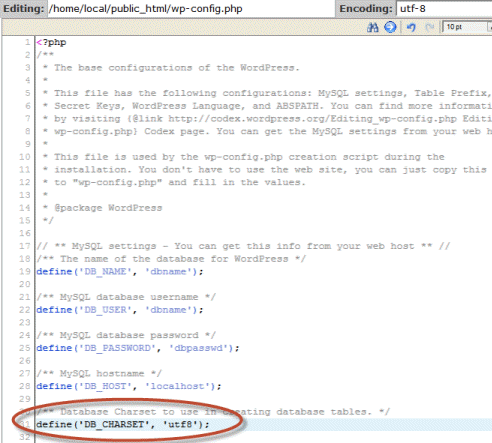
Second, you need to check if your theme is using the character set that is set in wp-config.php file. Look for the following line in your HTML:
<meta charset="UTF-8">And lastly, you need to check that your database content is stored with the same character set encoding that you are using in your wp-config.php file and HTML. If you are using phpMyAdmin to manage your database, you will be able to see the current server collation in General Settings.
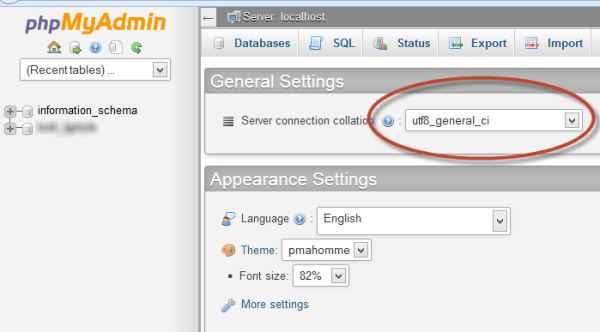
Changing the character set of complete WordPress database is not an easy task and should be done with a lot of care. Here are the steps to convert a database to your character set of choice.
1. First of all, we need to check the current character set of the database. Here’s the SQL query for checking:
SHOW VARIABLES LIKE "character_set_database";2. If the character set is not what you want, you should take a backup of your database before you proceed further.
3. Run the following SQL query to change the characater set of complete database:
ALTER DATABASE MyDb CHARACTER SET utf8;Change “MyDB” to the name of your database.
4. Now convert the “wp-posts” table to the character encoding you want:
ALTER TABLE wp_posts CHARACTER SET utf8;Change the “wp_” if you are using a different prefix.
These steps will remove the question marks or other weird characters and will show proper foreign characters instead. If you have many columns in the WordPress database that are set to custom character set, you will need to change the character set of each column one by one.
Since UTF-8 is the most commonly used character encoding, if your blog uses some other character encoding and you want to change it to UTF-8, you can use the plugin called UTF-8 DB Converter. Although it has not been updated for quite a long time, it will be able to do its task efficiently. Please note that if you have a large database, converting the character set will take a long time.
Tell us about your experience if you are having the same problem.