When you enter a URL in the Chrome Omnibar, that URL will be saved in the browser history and will show up when you type a similar query next time. This means that, if you have entered a wrong URL, that URL will be persistent and will always show up when you type a similar query. This can be rather annoying, and deleting the browser history doesn’t clear it from the omnibar.

Here is a quick way to delete a URL from the Chrome omnibar.
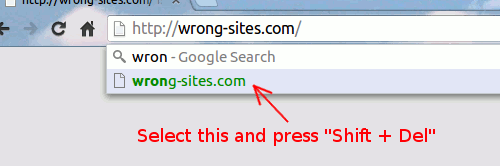
chrome-omnibar-delete-url

Type the query in the omnibar and wait for the suggestion to show up. Use the down arrow key to select the wrong URL and press “Shift + Del” (In Mac, use “Fn + Shift + Del”). This will immediately remove the item from the omnibar.

Note:
1. This trick only applies to URL. You won’t be able to remove search term with the “Shift + Del” key.

2. This trick applies to Firefox as well, except that you just need to press “Delete” instead of “Shift + Delete”.

What is Bitcoin And How You Can Utilize It Online

Do you know that the Internet actually has its own currency. Since 2009, we can pay and get paid using Internet’s own currency – Bitcoin.

How to Create QR Codes From The Context Menu In Your Browser

QR codes are becoming increasingly popular these days. In this article, we will show you how you can quickly create QR codes directly from your browser’s context menu.

9 Ways to Make Better Use of Gmail Filters

Gmail filters is a good way for you to organize your inbox without you doing the manual work. Here are a few ways that you can make good use of Gmail fliters.

What Is the OpenSSL Heartbleed Bug and Why Should You Care?

Things just don’t work the way they should in the Internet. Here are some things you should know about the OpenSSL “Heartbleed” bug and how it affects you.

Using the New Microsoft Office App in Chrome

Following up to its revamp of the office web apps, Microsoft released a Chrome extension that allows you to use Office in Chrome browser. Let’s check it out.

Stop Gmail from Showing You Targeted Ads

Google has been scanning your emails so as to serve you targeted ads. Here is how you can opt out of the system and stop Gmail from showing you targeted ads.

Syncthing: An Open Source Alternative for Dropbox and BitTorrent Sync

If you want to keep your files safe while synchronizing them between computers, Syncthing is a good alternative for Dropbox that you can use.

How to Schedule Downloads In Firefox

If you are concerned that your browser won’t be able to handle multiple downloads, you can use Download Plan to schedule downloads in Firefox

How to Opt Out of Facebook Browser History Ads on iOS, Android and the Web

Facebook is selling your search history to help advertisers better target you with specific products. If you are worried about your privacy, here’s how to opt out.

Can People Really Spy on Your Webcam?

There were news that the FBI was able to spy on people’s webcams without them knowing. How is this possible? Let find out how this hack was done.

How Facebook Scammers Use Disasters to Make Money from You

Facebook scammers love to turn the misfortune of others into an opportunity to make a quick buck. Here are some of the techniques they use.

4 Big Questions About Elon Musk’s Satellite Internet Plan Answered

A network in space to provide internet access throughout the world sounds good, but is it feasible? Here are the answers to some of the major questions asked.