For some reason, you can actually fit 2 million pixels into an image without using 1.97 megabytes of space. I found a sweet 1080p wallpaper (which has roughly 2 million pixels) and downloaded it. Checking the properties, I noticed something strange: It only took up 230 KB of space on my hard drive. Why is that? For someone who doesn’t quite understand image compression, it seems like magic. But once you get to know the subject, you’ll understand how some images are larger than others despite the amount of pixels they occupy on your screen. Time is short, so let’s take a quick dive into the basic principles behind image compression.
Methods, Approaches, Algorithms Galore.
It’s naive to think that there’s just one way to compress an image. There are different methods, each with a unique approach to a common problem, and each approach being used in different algorithms to reach a similar conclusion. Each algorithm is represented by a file format (PNG, JPG, GIF, etc.). For now, we’re going to talk about the methods that are generally used to compress images, which will explain why some of them take up so much less space.
Lossless Compression

When you think of the word “lossless” in the context of image compression, you probably think about a method that tries its hardest to preserve quality while still maintaining a relatively small image size. That’s very close to the truth. As a method, lossless compression minimizes distortion as much as possible, preserving image clarity. It does this by building an index of all the pixels and grouping same-colored pixels together. It’s kind of like how file compression works, except we’re dealing with smaller units of data.
DEFLATE is among the most common algorithms for this kind of job. It’s based on two other algorithms (Huffman and LZ77, if you’re a bookworm) and it has a very tried-and-true way of grouping data found within images. Instead of just running through the length of the data and storing multiple instances of a pixel with the same color into a single data unit (known as run-length encoding), it grabs duplicate strings found within the entire code and sets a “pointer” for each duplicate found. Wherever a particular string of data (pixels) is used frequently, it replaces all of those pixels with a weighted symbol that further compresses everything.
Notice how with run-length encoding and DEFLATE, none of the pixels are actually eaten up or forced to change color. Using this method purely results in an image that is identical to the raw original. The only difference between the two lies in how much space is actually taken up on your hard drive!
Lossy Compression
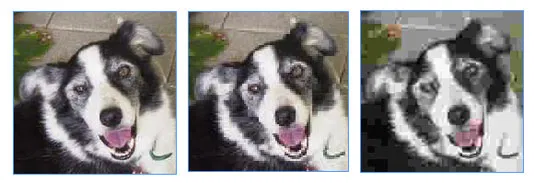
As the name implies, lossy compression makes an image lose some of its content. When taken too far, it can actually make the image unrecognizable. But lossy doesn’t imply that you’re eliminating pixels. There are actually two algorithms commonly used to compress images this way: transform encoding and chroma subsampling. The former is more common in images and the latter in video.
With transform encoding, an image’s colors are averaged out using a special mathematical formula called discrete cosine transform. The image suffers color loss and may introduce artifacts (weird pixellation at random points of the image) when used excessively. This particular algorithm makes up for its clumsiness with a strong advantage: You can dictate just how much quality you want to remain with the image. With lossless compression, the closest you can come to manipulating quality holistically is by setting the number of colors each image should have.
Chroma subsampling takes another approach. Instead of averaging small blocks of color, which also may affect the brightness of an image, it carefully attempts to keep brightness the same on all areas. This tricks your eyes into not readily noticing any dip in quality. It’s actually great for the compression of animations, which is why it is used more in video streams. That’s not to say that images don’t also use this algorithm.
But wait, there’s more! Google also took a shot at a new lossy algorithm, known as WebP. Instead of averaging color information, it predicts the color of a pixel by looking at the fragments surrounding it. The data that’s actually written into the resulting compressed image is the difference between the predicted color and the actual color. In the end, many of the predictions will be accurate, resulting in a zero. And instead of printing a whole bunch of zeroes, it just compresses all of them into one symbol that represents them. Image accuracy is improved and the compression reduces image size by an average of 25 percent compared to other lossy algorithms, according to Google.
It’s Time For Questions And Discussion!
If you’re new to the world of image files, you’ll probably find at least a little of this information confusing. If you have a question, post it in the comments and we’ll do our best to answer it. Otherwise, you’re welcome to discuss this!