There are times when you opened too many tabs in your browser and it is causing the whole system to slow down. A quick and easy way to fix this is to close as many unused tabs as possible to minimize the memory usage. However, it can be a chores if you have tons of opened tabs. Luckily, most browsers come with a way for you to quickly close multiple tabs with a single click.

In your browser, be it Google Chrome, Firefox, Safari, or Opera, all you have to do is to right-click on any tab and you will be able to select the option “Close tabs to the right”.
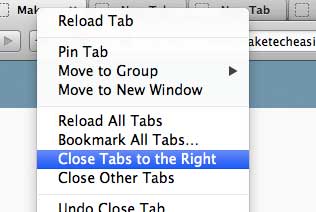
firefox-close-tabs-to-the-right

This will close all the tabs at the right of the current tab. Alternatively, you can also select the option “Close other tabs” which will then close all tabs except for the current one.

Note: The “Close tabs to the right” feature is only available in Firefox 24.0 and above. It is not available for Safari though.

How to Sync Bookmarks Between Firefox and Chrome

If you work with both Firefox and Chrome, and need your bookmarks to be available on both of them, here is how you can sync bookmarks between Firefox and Chrome.

What is Bitcoin And How You Can Utilize It Online

Do you know that the Internet actually has its own currency. Since 2009, we can pay and get paid using Internet’s own currency – Bitcoin.

Is Your Email Provider Leaking Your IP Address to Recipients? Here’s How to Find Out

If you care about your privacy, you need to make sure that your email provider is not leaking your IP address to recipients. Here’s the tool for the job!

Internet Regulation: Is it Going to Happen Soon? What Can You Do About It?

If one country could ban a website from its borders, what prevents other countries from doing the same? Can Internet regulation ever be good?

Run LastPass Security Audit to Ensure Maximum Security

To make sure you have a secure password, LastPass comes with a security audit feature that allows you to know the strength of your overall passwords. Let check it out.

Looking For a Secure Chat App? Try BitTorrent’s New P2P Messenger Bleep

Looking for an app to chat securely and privately with your friends? Try BitTorrent new P2P messenger Bleep that offers end-to-end encryption.

TunnelBear VPN: A Beautiful Bear That Just Works

Need a VPN service? TunnelBear VPN can encrypt your Internet connection while changing your public IP address to the country of your choice. Read on for the review and giveaway.

Todoist Review: Get Organized and Boost Your Productivity

Want to get organized and boost your productivity in the new year? Todoist can help and now is your chance to win a one-year premium subscription.

4 Big Questions About Elon Musk’s Satellite Internet Plan Answered

A network in space to provide internet access throughout the world sounds good, but is it feasible? Here are the answers to some of the major questions asked.

Top Places to Get Free Licensed Fonts for Personal and Commercial Use

Looking to expand your fonts library? Here are some of the top places where you can download free licensed fonts for personal and commercial use.

Why Websites Go Down, And What They Do About It

Have you ever wondered what large companies do to ensure that their websites stay up, and why websites sometimes go belly-up for a few hours? It’s time to speak about both of these things!

5 Chrome Apps to Maximize Your Productivity

There are many productivity apps that can help us become more efficient. The following apps make use of Google services and are particularly handy as Chrome apps. Check them out.