We all use our country’s currency in everyday’s life, but what about when we surf on the Web? It is obviously possible to use the same currencies online, but what most people do not know is that the Internet actually has its own currency. Let me introduce you to Bitcoin.
It is very possible to live our entire life online. We can chat with our friends, we can obtain knowledge from ebooks and we can order food or medicines using the web. And, since 2009, we can even pay and get paid using Internet’s own currency – Bitcoin (sign: BTC).
The origin of Bitcoin
Created in 2009 by the Japanese pseudonymous developer Satoshi Nakamoto (it is not known if, behind this pseudonym, was a person or a whole group), this currency is a free open-source project based in the peer-to-peer technology, with all its issues and transactions being carried and managed by the whole network instead being centralized, as happens with the regular currencies. This means that, if you want to be paid by a friend living in the other side of the world, that payment made with Bitcoins will not involve any other entity such as banks.
How Bitcoin works
Just like Paypal where every account is associated with an email address, everyone transacting Bitcoin has at least one unique address, made by a set of regular characters. When your friend send money to you, the network adds your unique address to the Bitcoins and sends them to you; now you own that amount, while your friend is prevented from using it again by the network.
The scheme below represents this process, for a transaction of 2.00 BTC using more than one address.
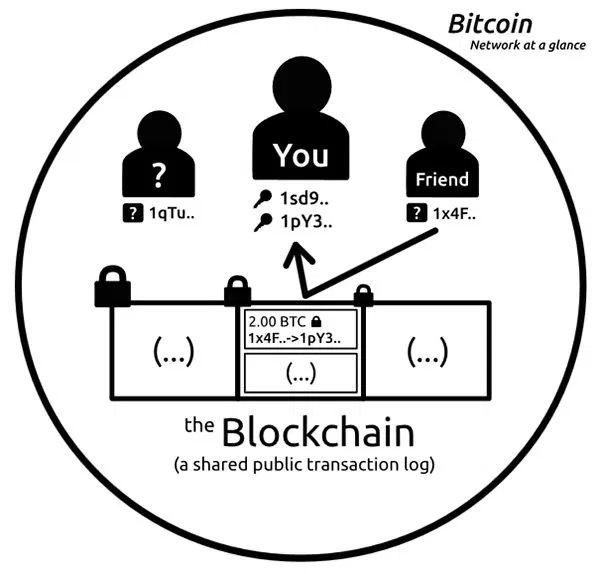
Unlike Paypal that transacts in the physical currency, Bitcoin is the currency for the Web. Regardless which country you are residing, you have to own Bitcoin to transact in Bitcoin.
Managing your Bitcoin
To manage your Bitcoin and all its transaction, you have to use a software call “wallets“. There are various software available for multiple operating systems and platforms both as desktop (requiring installation) or web-based, which are required to be a part of the Bitcoin network. Your wallet generates your Bitcoin address, and through it, lets you send and receive Bitcoins from other users. It is basically your account manager – much like the regular e-banking services: you can watch your balance, the transactions you made, pay for services and goods, make transfers, and so on. Also, you don’t have to be online in order to be paid; the wallet software receives and holds your money in place until your next connection.
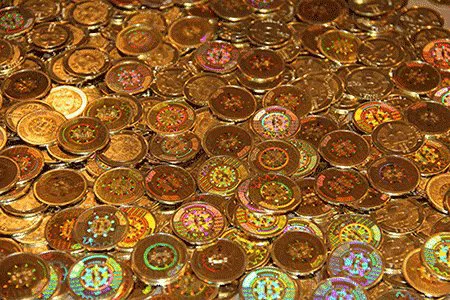
(There are actually real coins made, which are basically collectibles containing codes to be redeemed by digital Bitcoins.)
Earning Bitcoins
At this moment, you’re probably wondering how to gain access to Bitcoins. The first and easiest way is to simply buy them , and there are many places to do this. It is also possible to generate Bitcoins. That’s right – growing money!
Mining Bitcoins
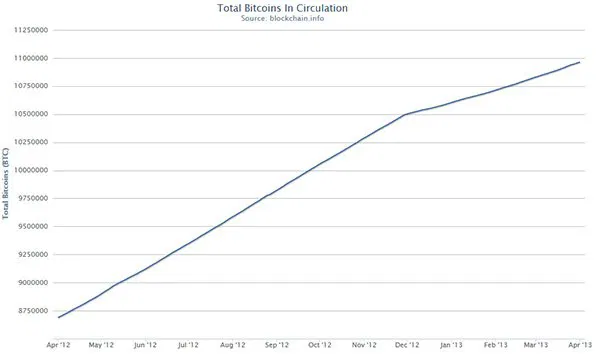
This process, however, is much harder than it seems. Mining is a way to process and monitor transactions through the creation of blocks – permanent records of Bitcoin activity and new Bitcoins. Whenever a block is created, an ever-decreasing (halving every 210K blocks) bounty (in BTC) is awarded to its creator, and that block gets in line with other blocks, thus forming a blockchain. In order to perform the mining process, you need the right software and hardware. Since the mining rewards (this is the number of Bitcoins generated per block) are always decreasing, the number of Bitcoins in existence will never exceed 21 million. In this graph, you can watch the evolution of the total Bitcoins in circulation, which is still under 11 million.
Some concerns with security might arise, like in all other online payment methods. Even though all Bitcoin transactions are stored publicly, available for anyone wanting to see them and providing information such as one’s balance and address, it is not possible to associate such data to its physical owner. This means that, unless you publicly display your Bitcoin address, no one will know that it belongs to you. However, to improve security, it is suggested that users create a new address every time they make a transaction and that they hide their computer’s IP.
There are many ways in which you can use Bitcoins, both online (art, web hosting, design, e-mail services, security services, software, and many others) and offline (auction sites, toys, clothing, electronics, consumables, books, music, and even professional services). In fact, more and more stores and professionals are accepting this currency as payment. It is safe to say that Bitcoin, like nearly every Internet-related creation, is shaking the actual society.
It was recently reported that Bitcoin value has reached $1 billion, which is too much to not take into account. Since Bitcoin is not related to any institution or government, it tends to be safer than the usual currencies that are tied to current economy in crisis. However, it is important to highlight that the Bitcoin world is still in development, so it is not possible yet to know the true potential and effects that Bitcoin might have in our lives.
Do you think that Bitcoin might succeed? Can it represent the future of our Economy, or is it just another bubble waiting to be burst? Let us know in the comments.
Image credit: Stack of bitcoins isolated on white by BigStockPhoto