In the wake of the PRISM event and the statement that Google make “Gmail users have no reasonable expectation that their communications are confidential“, perhaps it is really time for us to wake up and start to take the privacy issue more seriously. We have discussed plenty of privacy precautions and measures that you can take, but we never really discuss securing your email, particularly Gmail privacy.

Google doesn’t encrypt your message by default. In fact, it will even scan your mail content so as to serve you related ads. If you are planning to fix things up on your own, there is a Chrome extension – Secure Gmail, that allows you to encrypt your email.

Note: Secure Gmail is only available for Google Chrome.

1. In Google Chrome, install the Secure Gmail extension.

2. If you are already logged in to Gmail, refresh the browser. If not, log in to Gmail. You should see a “Lock” icon beside the Compose button. Click on it.
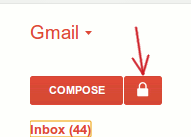
secure-gmail-lock-button-beside-compose

3. A new secured Compose window will pop up. You can now compose your message like you usually do. Notice that at the bottom, it shows a “Save failed” icon when Gmail attempts to save a draft of your message. This shows that your draft message is not saved in Google server.
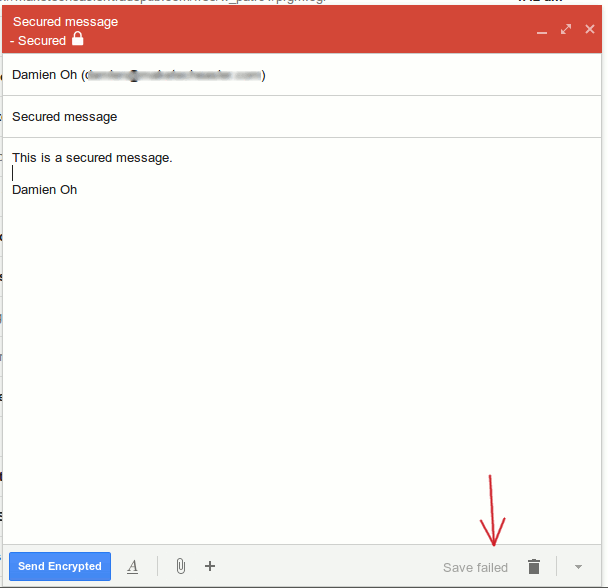
secure-gmail-compose-window

4. When you are done composing your message, click the “Send Encrypted” button. A dialog box will pop up to prompt you to enter the password for this message. The recipients will have to enter this password to decrypt the message.
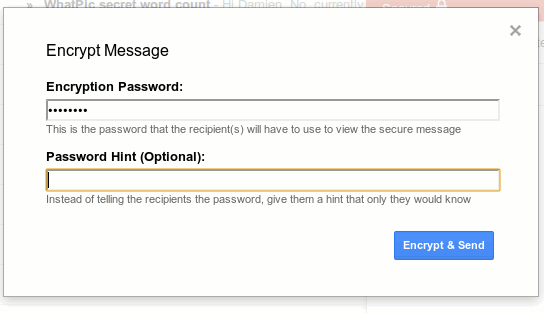
secure-gmail-encryption-password

5. This is what the recipient will see when they open the encrypted message.
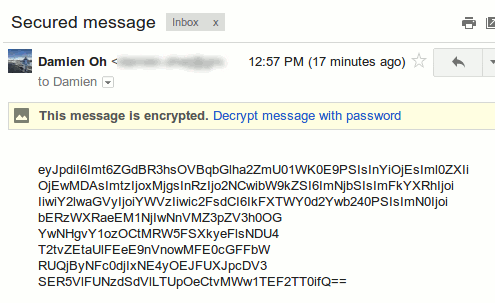
secure-gmail-recipient-encrypted-mail

6. To view the message, the recipient have to click the “Decrypt message with password” link and enter the password. If they did not have the Secure Gmail installed, there will also be a prompt for them to install the extension.
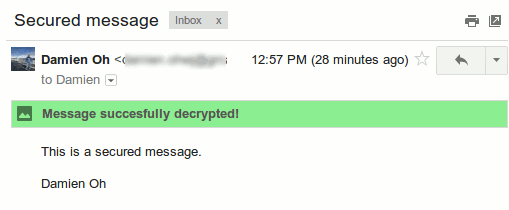
secure-gmail-message-decrypted

Conclusion

At the moment, using Secure Gmail can be rather cumbersome as it is available only for Google Chrome and both you and the recipients need to have the extension installed. However, for encrypting Gmail message, this is currently the best solution you can get.

Turn Multi-Page Articles Into a Continuously Scrolling Single Page

Have you ever clicked on an article that was broken up into numerous pages? Those multi-page articles can be really annoying and time-consuming. If you’re tired of clicking “next” over and over again, here’s how to turn those multi-page articles into a single page.

Best Plugins to Automatically Watermark Images In WordPress

One of the way to protect your images online is to add watermark to your images. Here are some of the best plugins that you can use in WordPress to automatically add watermarks to the images you uploaded.

Why You Should Have Local Backups Of Your Cloud Backup

When it comes to cloud storage, one of the things you shouldn’t do is to place all your eggs in one basket. You should also take the precaution to backup the data to somewhere you can physically access. Allow me to explain why.

How to Fix Foreign Characters Not Showing Up issue In WordPress

If you enter foreign character in WordPress, but only see question marks (???) showing up, here is the fix for this issue without losing any data.

How Image Compression Works: The Basics

Do you know that you can easily compress your high-res images to smaller size without affecting its image quality? Here’s how image compression works.

How to Add Notes to Specific URLs in Chrome

Bookmark a URL doesn’t allow you to add your own notes about that site. If you want to add notes and save webpages at the same time, AnnoPad is a great solution.

Why Am I Not Getting My Full Internet Speed on Fiber?

Despite the fact that fiber is amazingly fast, it’s not necessarily delivering the Internet speed it promises. Check out the reasons why is this so.

Restore Firefox’s Older “Strata” Theme with Greater Efficiency Than Before

For those who dislike the new Firefox “Australis” theme, you can install the “Classic Theme Restorer” addon to restore the popular Strata theme. Here is how it works.

End-To-End Encryption (And Principle) Explained

You probably have heard the term “end-to-end” plenty of times, but what is it really about? Read on to find out more.

MTE Explains: What Is an RFC?

You’ve probably seen the term RFC thrown around in applications that you’ve been using. What is this mysterious RFC that people been talking about? Let’s find out.

How to Restore the Old Search UI to Firefox

Firefox 34 changed the look of the search box. For those who are not used to the new look, here’s how you can restore the old search UI in Firefox.

How to Add Emails to Google Tasks Within Gmail

If you use Gmail in Google Chrome, here’s a handy extension that allows you to see your Google Tasks along with your Gmail inbox.