Let’s say you have a scanned copy of your textbook in image format and you want to convert them into text where you can edit it in your text editor, what is your best solution? Using an Optical Character Recognition (OCR) software is your best bet. However, most OCR software doesn’t come cheap, and paying the hefty price just for a single usage may be too much for us to bear. Luckily, if you are a Google Drive user, you can now make use of its OCR technology to convert images to text for free.

To get started, you need to make sure that your images contain text that can be converted to a word document. It can be in the jpg or png format. A PDF file will work fine too. Next, you must also have a Google Drive account (your Google Drive account is the same as your Google account).

1. Go to Google Drive in your browser. Make sure you are logged in.

2. Click the “cog” button on the right. Under “Upload Settings” select the option “Convert text from uploaded PDF and image files.”
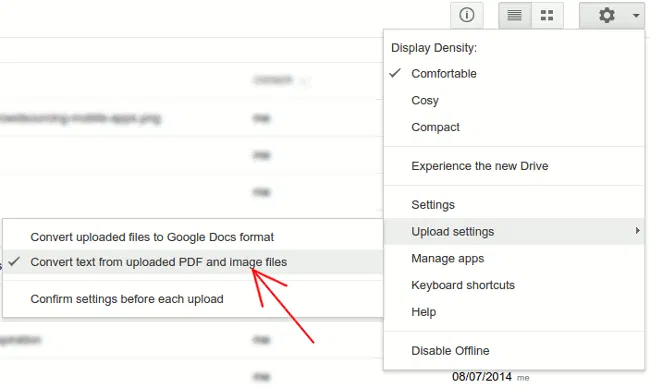
google-drive-convert-text-settings

3. Next, click the “Upload” button and upload your image/PDF files. In this case, I uploaded a screen capture of one of our articles (in png format).
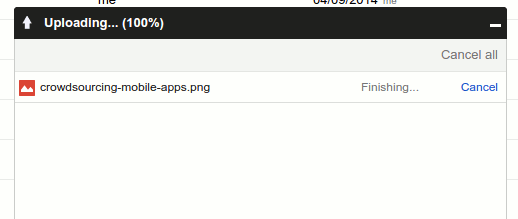
google-drive-upload-image-file

4. Once the uploading is completed, Google Drive will process in the background to convert the images into a text file. Once done, you should see the converted file in your Drive.
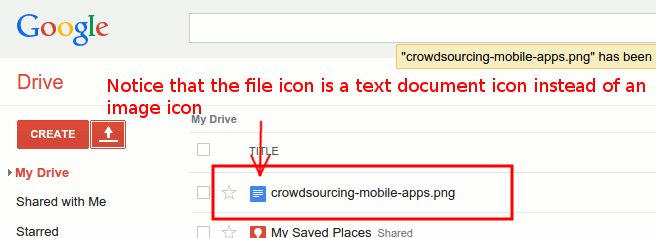
google-drive-uploaded-converted-image-file

5. Click to open the converted file, and you should find a copy of the image file and the associated text in the document.
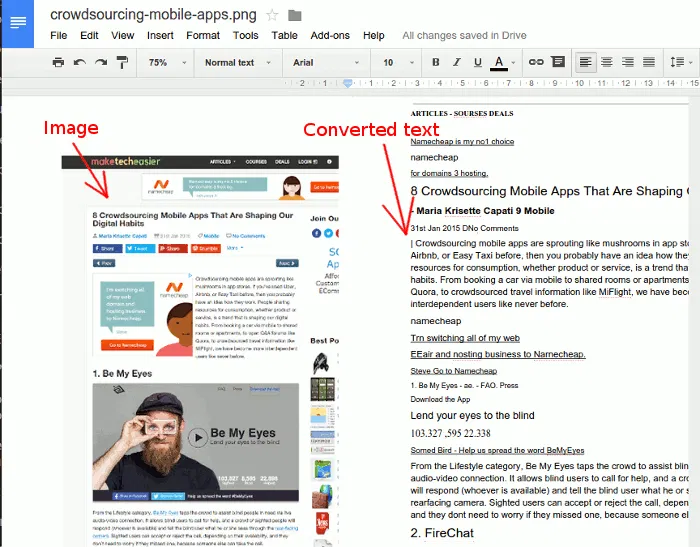
google-drive-open-converted-image-text-file

Do note that depending on the image resolution, text font and other factors, the text conversion might not be one hundred percent accurate and the formatting might not be aligned. In most cases, you should be able to get a big chunk of text correctly converted from the image file. Also, do note that you can only upload a file sized 2MB and below, and only the first ten pages of a PDF file will get converted. If you have a PDF file with tons of pages, split it into several files before uploading.

Once converted, you have the option to edit it in Google Drive, or download it in your preferred format and edit on your computer with your favorite text editor.

Don’t forget to uncheck the “Convert text from uploaded PDF and image files” option to avoid any future uploads being converted to text format.

Try it out and let us know if this works for you.

Follow YouTube Channels Easily With YouTube Video Deck

There are approximately two bajillion videos on YouTube and staying up-to-date on a couple of channels could be difficult. YouTube Video Deck makes it easier and faster to follow YouTube channels.

5 Dictionary Tools for Google Chrome

Do you remember back when you had to know how words were spelled? Here is a selection of dictionary tools for Google Chrome.

How to Copy All Links on a Web Page in Firefox

Have you ever wanted to copy all links on a web page while browsing? This Firefox add-on lets you copy all links on a web page in a matter of seconds.

How to Create QR Codes on DuckDuckGo

If you use DuckDuckGo as your default search engine and want to create QR codes quickly, you can now create them directly on DuckDuckGo.com. Here’s how.

Light – A Lightweight and Speedy Firefox Alternative

Light is a lightweight browser built with speed in mind and is ideal for old machines. It is a Firefox alternative with several non-essential features removed.

How To Play Flappy Bird on Any Phone, Tablet or Computer

Flappy Bird is no longer around in the App store, but if you just want your old game back, there’s also a HTML5-based clone edition of Flappy Bird.

Internet Censorship: How Countries Block Their Citizens from Entering Websites

Some countries carry out Internet censorship and block their citizens from entering websites. How do they do this? Here’s the answer.

Pushbullet: Push Links and Files From Chrome or Firefox to Your Android Device

Sending content from desktop to Android is not as easy as it seems. An extension called Pushbullet for Google Chrome and Firefox makes this task easier.

End-To-End Encryption (And Principle) Explained

You probably have heard the term “end-to-end” plenty of times, but what is it really about? Read on to find out more.

Three Free Fonts to Spice Up Courier

Courier New is the most popular variant of the monospace typeface. Here are 3 free versions of Courier to spice up your working environment right now.

How to Clone and Migrate WordPress Sites the Easy Way

Migrating your WordPress site? Duplicator allows you to easily clone and migrate WordPress sites without messing with a whole lot of complicated settings.

Why Websites Go Down, And What They Do About It

Have you ever wondered what large companies do to ensure that their websites stay up, and why websites sometimes go belly-up for a few hours? It’s time to speak about both of these things!