Have you ever clicked on an article that was broken up into numerous pages? Those multi-page articles can be really annoying and time-consuming. If you’re like me, you get tired of clicking “next” over and over again and often give up halfway through the page. I’ve even gotten to the point now that if I see page numbers and “next” at the bottom of an article, I’ll immediately close the page.

I hate to miss out on good content, so I went on a search for a tool to help fix this issue, and I came across PageZipper. It’s a bookmarklet that automatically merges multiple page articles into a single page and adds auto pagination functionality.

Here’s how to turn those multi-page articles into a single page.

1. Add the PageZipper bookmarklet to your browser; drag the PageZipper link to your bookmarks toolbar.
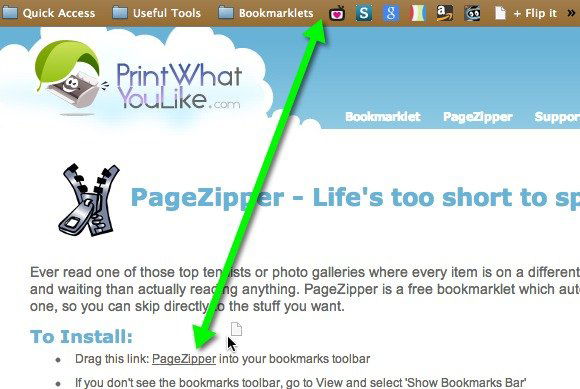
Drag the PageZipper bookmarklet to your bookmarks bar.

Note: PageZipper is also available as a Firefox add-on. I’m using the bookmarklet simply because it’s lighter on my browser – I have enough extensions installed already.

2. Click on the bookmarklet, and you should see a little box with arrows and page numbering at the top right of the page. As you scroll through the pages the numbering will automatically increase (2/3, 3/4, 4/5, etc), so don’t be alarmed if it only says 1/2 when you first click the bookmarklet.
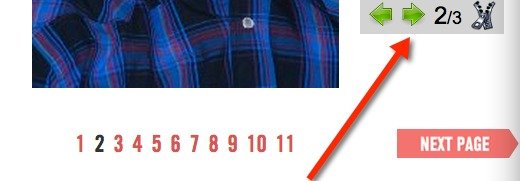
The box at the top right shows what page you're on.

3. As you scroll down the page, you’ll notice that the page keeps on scrolling continuously until you get to the end of the article; there’s no need to click on “next” to go to the next page. You can even use the arrows at the top to automatically scroll down and skip directly to the top of the next page.

These arrows really come in handy, because you’ll have to scroll through all of the comments on an article in order to get to the next page. If an article has a ton of comments, you’ll be doing a lot of scrolling. Those arrows really save a lot of time.

That’s really all there is to using PageZipper. It basically “unzips” those multi-page articles and eliminates the need to click next over and over again. It’s a huge convenience.

How to Compose A New Email Directly From Your Browser [Quick Tips]

Regardless which email client you are using, when you need to compose an email, you will always need to switch to your email client and click the “Compose” button. Here is a neat trick for you to compose a new email directly from your browser.

How to Password Protect a Spreadsheet in Google Drive

Google Drive offers a lot of features for users, but some of the basics have always been missing, such as password protection. Here is how you can password protect a spreadsheet in Google Drive.

How Is Simple Different From Traditional Banking?

Simple is an online service that seeks to change the way people manage their money, but just how is it different from traditional banking?

Speed Dial with Full Online Sync For Firefox

Even being a veteran browser, Firefox has not been able to implement the Speed Dial function well. That’s where FVD Speed Dial comes into play. This fully functional Firefox addon fundamentally changes the Speed Dial feature to what it should have been all along.

How to Create QR Code in Google Drive

There are tons of ways to create QR code. If you are a Google Drive user, here is one quick way to create R code in Google Document

6 Alternative Uses of WordPress, Other Than Blogging

You can be sure of one thing, Wordpress: it’s not just for blogs anymore. Here are 6 alternative uses of Wordpress that aren’t blogging.

Light – A Lightweight and Speedy Firefox Alternative

Light is a lightweight browser built with speed in mind and is ideal for old machines. It is a Firefox alternative with several non-essential features removed.

How to Know the Word Count of Any Text in Firefox

For those who need to keep track of word count, Word Count Tool for Firefox allows you to easily find out the word/character count of highlighted text in the browser.

Get Facebook Chat Heads in Google Chrome

Facebook chat heads is only available for Facebook Messenger app, but now you can use it in Google Chrome with the faces.im extension.

How to Get Yahoo Mail Notifications in Firefox

If you use Yahoo Mail, you can use the “Fastest Notifier for Yahoo Mail” add-on for Firefox to check and receive Yahoo mail notifications in the browser.

Enable HTML5 Playback in Google Play Music

The default settings of Google Play Music in a web browser make uses of Adobe Flash. Alternatively, you can switch it over to run on HTML5. Here’s how you can enable HTML5 playback in Google Play Music.

How to Enable Timed Website Blocking In Firefox

There are many distractions in the Web. PomodoroFox for Firefox lets you blocks unproductive websites that you specify and be more productive.