Do you use numerous widgets on your WordPress blog? Have you ever wished that you could add WordPress Widget Titles? If so, you’re in luck thanks to a WordPress plugin called Widget Title Links.

With this simple WordPress plugin, you can create clickable WordPress widget titles in just a few easy steps. These title links can really come in handy, such as linking to your social networking profiles, linking to blog posts or pages, linking to other websites, and more.

Here’s how to get links in your widget titles.

1. Install and activate the Widget Title Links plugin from the WordPress dashboard (plugins -> add new -> search plugins).
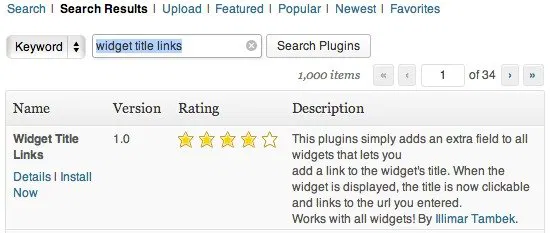
Install the Widget Title Links WordPress plugin.

2. Now go to your widgets (appearance menu -> widgets). You can either add a new widget to your sidebar or edit a widget that you already have enabled.

3. You’ll notice that all of your widgets now have two new text boxes: title and title link. In case you’re wondering, some widgets already have a title box included, but the ones that don’t will now have a place to enter a title.
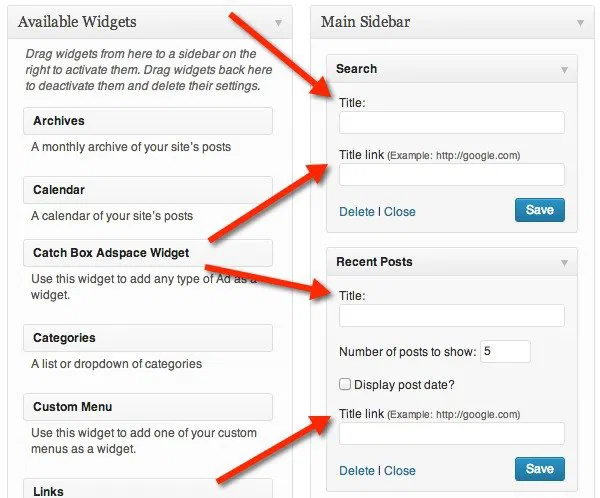
You should a title box and title link box for each of your widgets.

4. As you can see, you must enter a title to go along with your links; you can have a title without a link, but you can’t have a link without a title. When you’re done, click on “save” and you should see your new clickable links on your blog.
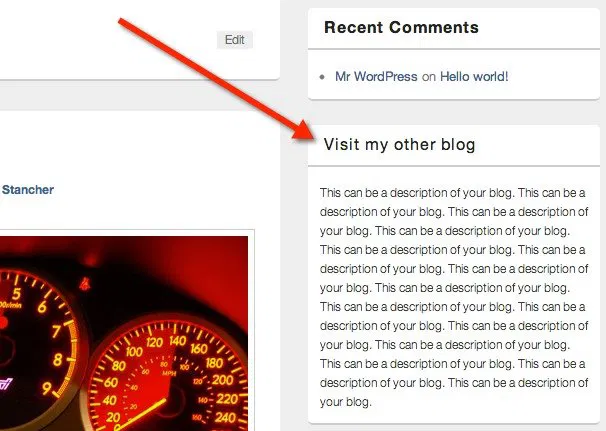
This is how your clickable widget title will look.

Depending on your blog’s theme, your clickable WordPress Widget titles may or may not be recognizable. If your visitors can’t tell that it’s a link, then you’ll probably want to do a little CSS tweaking.

How to Compose A New Email Directly From Your Browser [Quick Tips]

Regardless which email client you are using, when you need to compose an email, you will always need to switch to your email client and click the “Compose” button. Here is a neat trick for you to compose a new email directly from your browser.

Best Plugins to Automatically Watermark Images In WordPress

One of the way to protect your images online is to add watermark to your images. Here are some of the best plugins that you can use in WordPress to automatically add watermarks to the images you uploaded.

Get a Better Extension Manager In Chrome With SimpleExtManager

The extension manager in Chrome has always given users the bare minimum to work with when dealing with extensions, themes and apps. The SimpleExtManager for Chrome gives users the functionality they deserve.

4 Popular Bitcoin Alternatives and How They Compare to Bitcoin

The cryptocurrencies is here to stay. Bitcoin may be receiving the most attention at the moment, but it is definitely not the only one around. There are tons of Bitcoin alternatives. Here we will take a look at the 4 popular Bitcoin alternatives and see how they compare to Bitcoin.

15 Clocks For Telling Time Within Google Chrome

Your computer came with a clock that is functional enough, but there are so many more ways you could have your computer tell you the time. The Chrome Web Store is filled with various clock apps and extensions. Here are 15 options that might just add an extra bit of excitement to how you check what time it is.

Identity Theft on The Internet: Can You Prevent It?

What if someone else had enough information about you from the web to become you? What can you do to prevent identity theft? We’re here to help you out.

5 Great Sites That Help You Build Creative CVs

Your resume is an important part of your professional life and it doesn’t have to be boring. Here are 5 of the best sites to build a nice and creative CV.

How to Set Up and Use Mozilla’s Firefox Accounts

Firefox Sync is getting better in the new nightly version of Firefox. If you have not setup your Firefox account, here is how you can do so.

How to Manually Install Extensions in Google Chrome

If you want to install any extension in Google Chrome, that is not in the Chrome store, here is a way to manually install extensions in Google Chrome.

Firefox – Which Variant Should You Use?

With the open-source nature of Mozilla’s Firefox, there are many variants that you can use. The question is, which one is the best and which should you use?

Todoist Review: Get Organized and Boost Your Productivity

Want to get organized and boost your productivity in the new year? Todoist can help and now is your chance to win a one-year premium subscription.

Easily Download Torrents to the Cloud with Bitport

Are you having difficulty downloading torrents with your current Internet connection? Bitport allows you to download torrents remotely and access them online.