In the past, Gmail has never automatically loaded images in your email, unless you specified that you wanted images from a specific sender to always load. However, for some reason now, Gmail has decided to change that. Instead of being able to choose which senders to load images from, Gmail will now automatically load images from all senders; this is the new default behavior.

If you don’t like this new feature though, you can easily disable it and go back to the way things used to be. Here’s how to disable the always display external images feature.

1. Log into your Gmail account.

2. Click the gear icon (top right corner) and go to “Settings.”
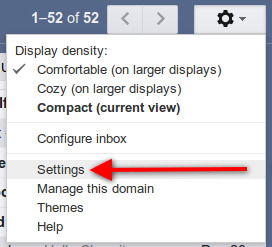
Click on the gear icon and then Settings in your Gmail account.

3. Under the “General” tab (you’ll already be there once you click on Settings), look for the “Images” section. Select the box next to “Ask before displaying external images.”
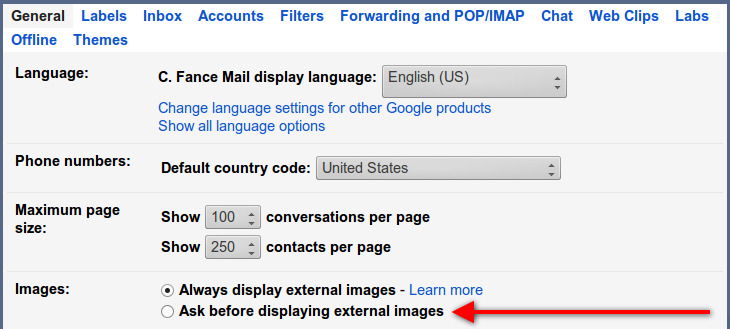
Make Gmail ask first before displaying external images in your email messages.

4. Scroll down to the bottom of the page and click on the “Save Changes” button.

That’s it. Now you’re back to the old method of not displaying images in your email messages, unless you choose to. Even though Google is now loading images on their own servers in hopes of better protecting you from spammers and marketers, it’s still pretty annoying to have this on by default. It’s a good thing you can revert back (for now anyway).

Block Javascript For A Single Site in Google Chrome

Rather than blocking javascript browser-wide, wouldn’t it be great if you can block javascript only for a specific site? Here is how you can do so.

How to Fix Foreign Characters Not Showing Up issue In WordPress

If you enter foreign character in WordPress, but only see question marks (???) showing up, here is the fix for this issue without losing any data.

Save and Restore Groups of Tabs in Chrome with This Quick Trick

Looking for a way to overcome having too many tabs open? Use this quick trick to save and restore groups of tabs in Chrome without installing an extension.

Rid Your Site of Any Profanity Content with WebPurify

To get rid of profanity and offensive content on your site, you can either moderate every single post manually, or automate it with an external tool. WebPurity is one useful tool built for this purpose.

Mastering Keyword Searches for Better Productivity in Firefox

Mozilla don’t call their address bar the “Awesome Bar” for nothing. Master the keyword searches in Firefox and turn the Awesome Bar into a productive tool.

How to Manually Install Extensions in Google Chrome

If you want to install any extension in Google Chrome, that is not in the Chrome store, here is a way to manually install extensions in Google Chrome.

How to Enable the Firefox Quick Find Feature in Google Chrome

Firefox comes with a Quick Find feature that allows you to search for text when you start typing. Here is how you can get the same feature in Google Chrome.

A New Exploit Is in Your Browser Right Now – How to Protect Yourself

Google has just discovered a POODLE exploit that can affect millions of browsers worldwide at this moment. Let’s see how you can protect yourself from POODLE exploit.

How Facebook Scammers Use Disasters to Make Money from You

Facebook scammers love to turn the misfortune of others into an opportunity to make a quick buck. Here are some of the techniques they use.

Easily Add Gesture Support to Your WordPress Site

Other than responsive design, it is also important to add gesture support to your website for mobile devices. Here is how you can do so in WordPress.

How to Restore the Old Search UI to Firefox

Firefox 34 changed the look of the search box. For those who are not used to the new look, here’s how you can restore the old search UI in Firefox.

9 YouTube Features You Probably Haven’t Heard of

Along with the great content, YouTube has also got a lot of great features. Here’s a list of 9 really useful YouTube features that you probably haven’t heard of.