Many people describe PowerPoint presentations as a royal pain – either because they don’t enjoy making them or because they’ve suffered through endless presentations with questionable color, font, and clipart combinations.

Luckily, you can find great guides teaching you how to create engaging, attractive presentations to keep the audience interested. You can make them using both online and offline tools. An excellent way to boost your personal brand is sharing your presentations on the Internet. Whether you wish to draw attention to your ideas and expertise or just want to expand your portfolio, these websites can help you.

SlideShare
share-presentations-slideshare

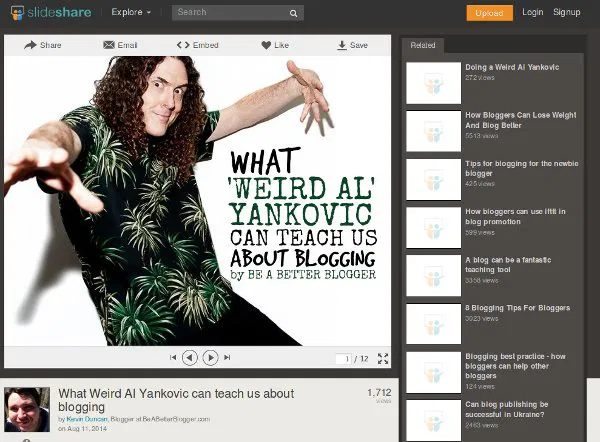
You’ve probably heard of SlideShare, as it’s the most popular presentation-sharing platform. It supports many file formats: Keynote, PDF, Microsoft Word and Open/Libre Office documents (PPT, DOC, ODT, ODP …). Uploaded presentations are sorted by categories so you can browse and preview them. Related presentations will pop up on the right side, which I found distracting, but you can always toggle the full-screen view. Note that presentations can be downloaded only if the author enabled it.

If you register for an account, you’ll be able to post directly to social media (Twitter, Facebook, LinkedIn, Pinterest…) and via email, as well as embed YouTube videos into presentations. SlideShare also offers mobile apps for iOS and Android, so you can take your presentations anywhere.

SpeakerDeck
share-presentations-speakerdeck

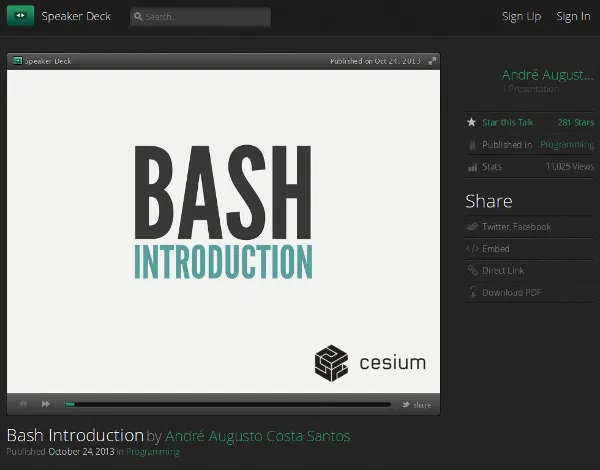
SpeakerDeck uses trendy fonts and a dark color scheme, giving the impression of a professional, stylish presentation-sharing website. The interface is well-organized and focused on the presentation; there’s no clutter since the comments and social links are displayed below it.

Presentations on SpeakerDeck are sorted by category, and you can download them without an account, but you’ll need one to share your own. You can upload PDF files (up to 50 MB each). SpeakerDeck then converts pages to slides and gives you embed codes for sharing your presentation. It’s simple and quick, which is why SpeakerDeck is my second favorite website on this list.

Conclusion

Your presentations don’t have to be strictly related to your job – you can use these websites to share photos from your travels, collections of your favorite quotes, or bundles of cool and useful links. Where do you share your presentations? Which website from this list is your favorite? Let’s hear it in the comments.

Image credit: presentation eboard woman silhouette economy

How To Save Highlighted Text in Firefox Into a File

Researching on the Internet can sometimes be cumbersome. The Save Text To File extension for Firefox allows you to save highlighted text in any web page into a .txt file, then save it in any location on your hard drive.

You Will Surely Have A Corrupted WordPress Database Issue. Here Is How You Fix it

WordPress, like any other database driven application, is very prone to having the corrupted database issue. This article shows you how to recover from the issue and get your site back up working again.

Why You Should Have Local Backups Of Your Cloud Backup

When it comes to cloud storage, one of the things you shouldn’t do is to place all your eggs in one basket. You should also take the precaution to backup the data to somewhere you can physically access. Allow me to explain why.

4 Great Ways to Take And Edit Screenshots in Google Chrome

Taking screenshots can be time-consuming. Here are 4 screenshots tools for Google Chrome that allow you to snap and annotate screenshots all in the browser.

Still Need a 2014 Calendar? Make One Using Pically

Are you still looking for the perfect 2014 calendar. Pically is a free program that you can grab and use to create beautiful calendars using your own photos.

Internet Censorship: How Countries Block Their Citizens from Entering Websites

Some countries carry out Internet censorship and block their citizens from entering websites. How do they do this? Here’s the answer.

3 Reasons Why Encryption Is Not as Safe as You May Believe

What if I tell you that your encrypted data may already be cracked by the hackers? Here are some examples why encryption is not as safe as you may believe.

Hands-on with Github’s Atom Text Editor

The developers of Github decided to come out with its own text editor – atom. Let’s check out Atom text editor and see how it fares with other text editors.

How to Change WordPress Permalink Structure

Do you want to change your website URL structure? Here is how to properly change your WordPress permalink structure and URL redirect.

Easily Download Torrents to the Cloud with Bitport

Are you having difficulty downloading torrents with your current Internet connection? Bitport allows you to download torrents remotely and access them online.

8 Common Browser Error Messages That You Should Know

While surfing the web, you probably have come across error codes like 404, 502, etc. Here are some of the most common browser errors that you should know.

Why Websites Go Down, And What They Do About It

Have you ever wondered what large companies do to ensure that their websites stay up, and why websites sometimes go belly-up for a few hours? It’s time to speak about both of these things!