PNG is a great format, especially when you want to make sure that the images are of high quality. However, compared to the commonly used JPG format, PNG Image files are generally larger in file size.

While we have shown you a few ways to compress images and reduce the file size from your desktop, you might prefer to do it online so you don’t have to install any software on your PC. If you are looking for a simple and effective way to reduce PNG file size without affecting their quality, try TinyPNG.

Depending on the size of the image, it can automatically reduce file size by decreasing the number of colors in the image. It reduces a 24 Bit PNG file to 8 Bit PNG file without losing transparency or really affecting the quality of the image.

Using TinyPNG

Using TinyPNG is simple and straight forward. You do not have to sign up for an account or fill out lengthy registration forms. Go to the TinyPNG home page and upload the file you want to optimize. You can either browse the file from within the online tool or drag-and-drop it into TinyPNG to start the conversion process. Currently the tool supports files up to 3MB, and you can easily select up to 20 images.
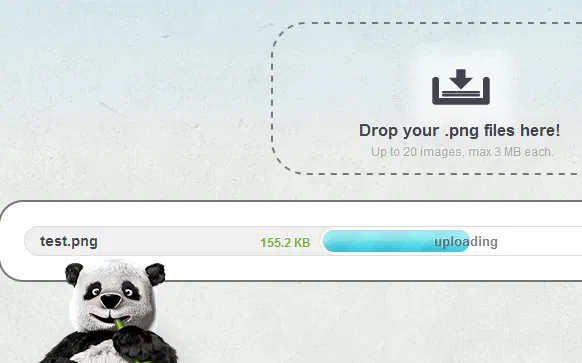
TinyPNG Upload

After completing the conversion, it will show you the original as well as the optimized file size of the image. You can then download the converted image and use it wherever you want.
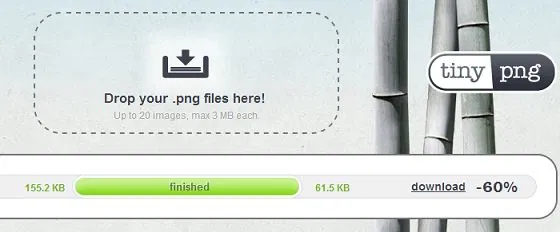
TinyPNG Status

Conclusion

If you are using PNG images on your website, it is best to optimize them first before you upload to the server. TinyPNG is great for those who don’t want to install additional apps on their systems.

One thing I would like to see in the service is the ability to create accounts so that you can manage your converted files online. Other than that, this is a useful nifty app that you probably want to keep in your bookmarks.

If you tried TinyPNG, we’d love to hear about your views in the comments section below.

How to Sync Bookmarks Between Firefox and Chrome

If you work with both Firefox and Chrome, and need your bookmarks to be available on both of them, here is how you can sync bookmarks between Firefox and Chrome.

How To Open Multiple Links in Chrome

You might come across a webpage with several links that you want to check them out. If you’re looking for a fast, efficient way to open links in the fastest way possible, then LinkClump might just help you with that.

4 Things You Should Know About Digital Cryptocurrencies (Bitcoin, Litecoin, PPCoin, Etc.)

The Internet has entered a new era in which people can start trading in currencies that are not run by governments, called cryptocurrencies. If you have heard all the hype and wanted to get involved, it’s best that you find out more before investing in digital cryptocurrencies.

How to Encrypt Your Gmail Message and Protect Your Privacy

If you are really concern about the privacy of your email, you should really consider encrypt your Gmail message so even Google can’t view it.

Need a QR Code? Quickly Generate a QR Code With This URL

Need a QR code? Here is one quick way to generate a QR code with a URL.

Forget Everything Else: Exclude Browsing History When Searching via Chrome’s Omnibox

Don’t want your browsing history, previously typed URLs or bookmarks displayed when searching from Chrome’s Omnibox? Use this quick trick to exclude them.

Replace and Enhance Browsers Capability With These Addons

Your browser comes with some capabilities that have become obsolete. Here are some extensions to enhance browsers capability and performance.

Why Am I Not Getting My Full Internet Speed on Fiber?

Despite the fact that fiber is amazingly fast, it’s not necessarily delivering the Internet speed it promises. Check out the reasons why is this so.

How to Enable the Firefox Quick Find Feature in Google Chrome

Firefox comes with a Quick Find feature that allows you to search for text when you start typing. Here is how you can get the same feature in Google Chrome.

How to Run Android Apps in the Google Chrome Browser

Have you ever used an Android app and find that it could be useful for your desktop as well? Here’s how you can run Android apps in Chrome browser.

Easily Download Torrents to the Cloud with Bitport

Are you having difficulty downloading torrents with your current Internet connection? Bitport allows you to download torrents remotely and access them online.

8 Common Browser Error Messages That You Should Know

While surfing the web, you probably have come across error codes like 404, 502, etc. Here are some of the most common browser errors that you should know.