Online privacy has become a major point of concern ever since ex-NSA contractor and whistle-blower Edward Snowden made revelations about the NSA’s abuse of its mass surveillance programs. The post-Snowden era, as they call it, has given birth to many applications specifically aimed at privacy and security-conscious users. One of these services is Bleep, a secure communications application from P2P file sharing company BitTorrent.
A brief history
Back in 2013, BitTorrent announced its plans to come up with a security-focused communications system. In July this year, the company unveiled a pre-alpha version of Bleep, which was largely aimed at invited testers and worked only on Windows 7 and Windows 8. Last month, the app entered open alpha and was made available to the general public. The company also added support for Mac and Android platforms.
What’s special about Bleep
The main feature that differentiates Bleep from other popular chat applications like Hangouts, AIM, Skype, and more, is that it lets you communicate with other Bleep users using peer-to-peer technology, something that doesn’t require central servers to house information. This means that unlike current chat apps that rely on centralized, cloud-based servers to store user messages, and are hence vulnerable to hackers as well as government surveillance, Bleep offers a decentralized system, which not only solves the aforementioned privacy- and security-related problems, but also creates infrastructure efficiencies as well as prevents single points of failure.
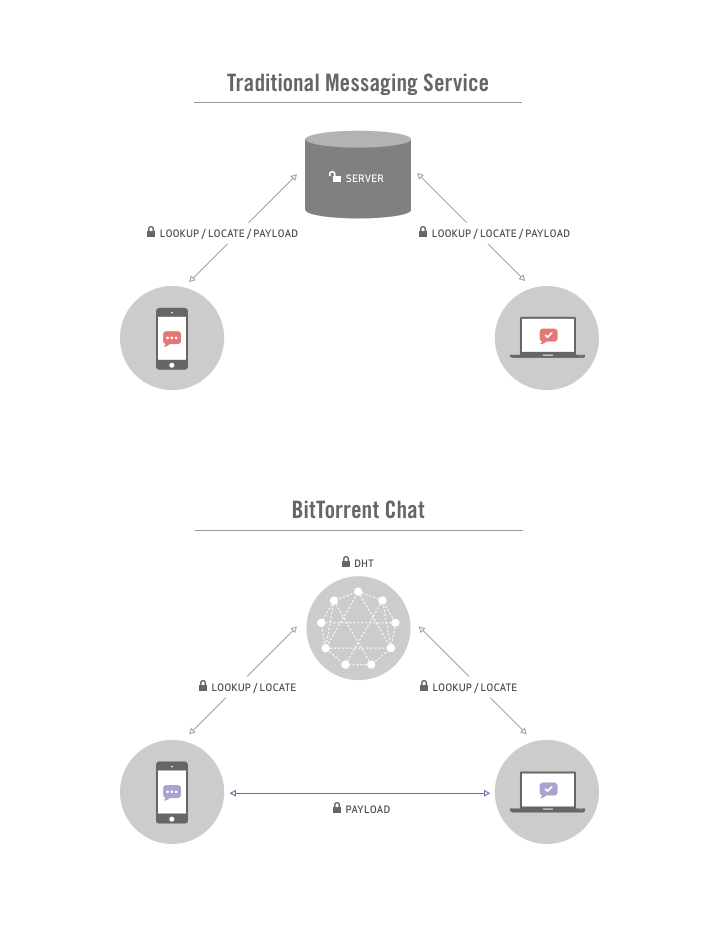
As is clear from the image shown above, Bleep uses Distributed Hash Table (DHT) to find IP addresses, the same technique that decentralizes torrents for uTorrent and BitTorrent. The way DHT works is: you ask your closest neighbour if they know of the person you are looking for. You then ask their neighbours, and this process continues until you get to a peer (neighbour) who knows the address of the person you’re looking for. They return this address to you.
The whole process is done in such a way that only you and the person you are looking up know who you are looking for. This is because BitTorrent has updated their DHT protocol to support encryption, enabling you to find each other securely and privately.
Besides Bleep, the decentralized architecture developed by BitTorrent can be used by other SIP-compatible clients as well. According to the company’s Director of Communications Christian Averill, BitTorrent is open to talk to those who want to incorporate the company’s new technology in their products.
Bleep features
Bleep offers end-to-end encryption, and each message you send is only stored locally on your device, ensuring robust privacy. The app, which also supports voice calling, allows you to easily delete your encrypted message history, should you choose not to leave any trace of conversation behind.
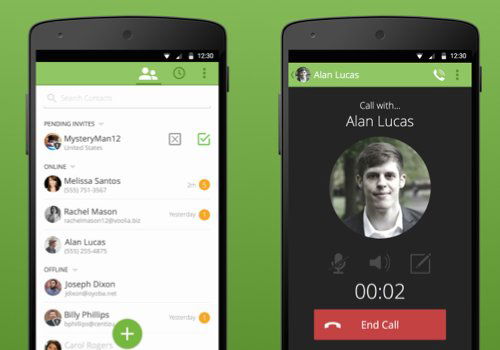
In addition, the app allows you to import your Google address book contacts, as well as invite your friends via email, SMS, QR code, or a public key. You can also move an existing account to an Android device and receive inbound messages across all devices.
Limitations
As the app is currently in its early stages, it has some limitations. For example, it currently has some issues with data consumption on Android, so it is advised that Bleep users on Google’s mobile platform set the app to “Wi-Fi Only” unless they have an unlimited data plan. In addition, the app does not yet support moving an existing account from Android to the desktop, although vice-versa is possible. Similarly, while messages can be received on multiple devices, messages sent will not be seen across all devices. And finally, the app allows you to communicate only with those who are online, which means that you cannot send offline photos or group chats asynchronously.
Download
Interested in giving Bleep a try? You can download the public alpha here. It’s easy to create a Bleep account, all it requires is your email or mobile phone number. You can also sign up in incognito, a mode that doesn’t require you to submit any of the aforementioned personal details.
Conclusion
Although Bleep is currently in its alpha, it’s worth trying out, especially because of the kind of security and privacy it claims to offer. The app could prove be a great tool for a variety of people, including friends who want to keep conversations amongst friends, journalists who want to communicate with their sources, businesses who want to keep their communications confidential, and more.