Not too long ago, a wonderful thing called onion routing (OR) has been invented. It was meant to protect your online privacy without slowing down your broadband connectivity. Shortly thereafter, Tor brought OR to the mainstream and allowed many people to browse the internet without feeling like someone’s snooping over their shoulder. After people found out in mid-2013 that the NSA has been keeping records of their phone calls and web data transfers, a massive panic broke out. People who resort to using Tor ask themselves whether they’re still safe or not. People considering using Tor to block any breach attempts by the NSA are concerned about whether their information really is protected. I’m here to tell you under what circumstances your data will still be looked at, and what you should really worry about.
Note: Before we begin, check the link above if you don’t fully understand how OR works. The article will explain, in lucid detail, how the OR network is utilized. Anything written below this line assumes you already know how onion routing works.
The Concern
Media outlets are reporting that using encrypted services like Tor could paint a big red dot on your shoulder, making government organizations more likely to keep your data. Their source is a secret government document titled “Minimization Procedures Used by the National Security Agency in Connection with Acquisitions of Foreign Intelligence.” It allows the NSA to treat people using Tor (which makes you look like you’re located in a country other than the US) as foreigners, allowing more “flexibility” with what they can snoop. If and when they determine that you’re in the US, the data must be destroyed. Of course, the destruction of your data can be suspended because they are “reasonably believed to contain secret meaning,” according to the document.
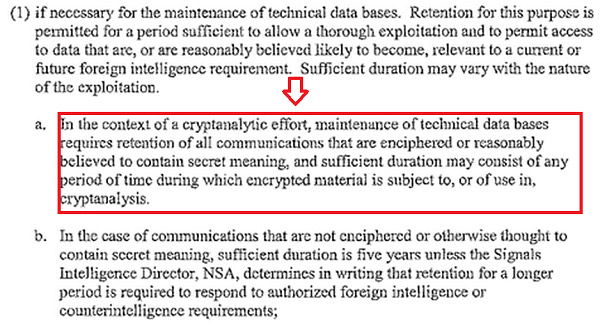
Even if the NSA is not directly ordered to track the information of US citizens, it still has that ability. In fact, it gets some of your data from companies that hand it out.
Can Tor Protect Your Online Privacy?
If Tor presents such a hazard for data breaches, how bad can it really be? OR uses a chain of computers from around the world to relay your data. That means that even if a government organization gets its hands on what comes out of the exit node, the data says it comes from the node behind it (in other words, the data will not disclose your computer as the origin). You’re safe, right?
I’d say yes. They won’t figure out the source of the data unless they manage to infiltrate each node and crack the multiple levels of encryption behind each set of data to match it against its final form. This is a very labor-intensive process and is not likely to happen to the average Joe. You’re most likely safe, unless you’re using plain-old HTTP. You see, with a normal web transaction, it really doesn’t matter where your computer is. If you’re logging into your email using Tor, for example, and you don’t use encryption (“https://”) to connect to the destination server, the exit node can easily track your activity. It knows your email address and can cross-reference it with a database. That’s enough to gather what you’re doing and who you are. Your identity will be snatched.
So here’s where it gets complicated: You’re relatively safe, as long as you’re using HTTPS (TLS/SSL encryption). In other words, as long as you’re connecting to an address with an “https://” before it, you’ll be at least somewhat protected. Even in such a case, there are ways around the barriers.

Also, encryption isn’t the only problem you face when using Tor.
Leaking Your IP Address Is Easier Than You Think!
If you have JavaScript and plugins enabled on your browser, you’re naked. Tor doesn’t exactly protect you from data leaks through these conventions. It all depends on the browser. However, everything will potentially fall apart at one point and give away your real IP address, making the fact that you are using Tor completely futile.
Also, as an added note, if you’re using other applications like BitTorrent, you can potentially expose your IP, even if you set up a proxy.
To address this issue, you should abandon Tor altogether and use AdvOR while hooking it onto the application you’re using directly. AdvOR takes over the entire application’s Internet connectivity, tricking it into using the OR network without giving it any possibility of revealing your real IP. It’s the only application (that I know) so far that does this. If you come across another application like this, do let me know.
Any Other Concerns?
If you have any questions about using the OR network to escape the grasp of government data-snatching programs, please comment below. I’ll be around to answer your questions.