Has there ever been a time where you wanted to copy all links on a web page while browsing? Or maybe you just wanted to copy all download links from a page? If so, the Copy All Links Firefox add-on is just for you. It’s a lightweight add-on that gives you the ability to copy all or select links (or just download links) on a web page; it even supports non-clickable text links.
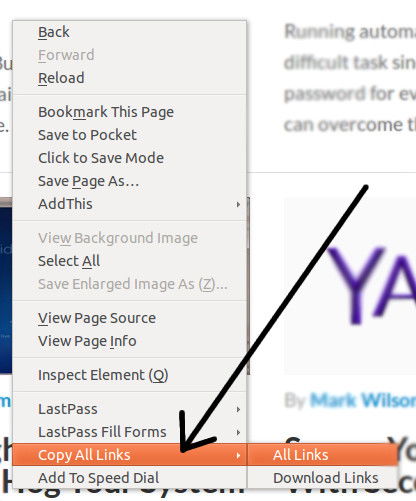
Copy all the links on a web page via right-click on Firefox.

To use it, first install the add-on and restart Firefox. Now, go to any web page with links, right-click anywhere on the page and go to “Copy All Links -> All Links.” All of the links will be automatically copied to your clipboard, so now you can go paste them into a text editor, document or anywhere else you’d like.

If you only want to copy the download links, then choose that from the right-click menu instead. Alternately, you can highlight a select group of links on the page and only those links will be copied to your clipboard.

Copy All Links

Analyze Writing Errors with SlickWrite for Firefox and Chrome

Most spelling and grammar checkers in word processors spot obvious writing errors, but not the less obvious ones. Slick Write is a web service that analyzes writing errors as well as performs the usual spelling and grammar check.

Play Music In Google Drive with DriveTunes [Chrome]

it’s not possible to play music in Google Drive, but installing a Chrome extension allows users to play music straight from the Google Drive directory,

How to Create QR Codes From The Context Menu In Your Browser

QR codes are becoming increasingly popular these days. In this article, we will show you how you can quickly create QR codes directly from your browser’s context menu.

This Firefox Add-on Can Resurrect Dead Web Pages

Don’t browser away from that dead or broken web page! Use this Firefox add-on instead, used to resurrect dead web pages.

Pushbullet: Push Links and Files From Chrome or Firefox to Your Android Device

Sending content from desktop to Android is not as easy as it seems. An extension called Pushbullet for Google Chrome and Firefox makes this task easier.

How to Organize History By Tags in Google Chrome

The History tool in Google Chrome can be in a mess sometimes. Better History provides a more structured way of searching and viewing recently visited sites.

Replace and Enhance Browsers Capability With These Addons

Your browser comes with some capabilities that have become obsolete. Here are some extensions to enhance browsers capability and performance.

Mastering Keyword Searches for Better Productivity in Firefox

Mozilla don’t call their address bar the “Awesome Bar” for nothing. Master the keyword searches in Firefox and turn the Awesome Bar into a productive tool.

How to Opt Out of Facebook Browser History Ads on iOS, Android and the Web

Facebook is selling your search history to help advertisers better target you with specific products. If you are worried about your privacy, here’s how to opt out.

Run LastPass Security Audit to Ensure Maximum Security

To make sure you have a secure password, LastPass comes with a security audit feature that allows you to know the strength of your overall passwords. Let check it out.

Should I Use a Website Creator or Hire a Web Designer?

If you are starting to setup your website, it can be hard to decide whether to hire a web designer or go with the different DIY website creators out there. Here are some points you should consider.

Three Free Fonts to Spice Up Courier

Courier New is the most popular variant of the monospace typeface. Here are 3 free versions of Courier to spice up your working environment right now.