Simple pitches itself as “Banking for humans, by humans.” It is an online service that seeks to change the way people manage their money by allowing them to store their money online without ever having to step inside a bank. The service is one of the largest innovations to how people manage their money we’ve seen in decades, but just how is it different from traditional banking?

Background

Simple is a company out of Portland, Oregon offering an alternative to traditional banking. They don’t view themselves as a bank, even though they partner with Bankcorp Bank to store your money. Anyone who uses Simple, even though they may never step inside a bank, is still storing their money inside one.
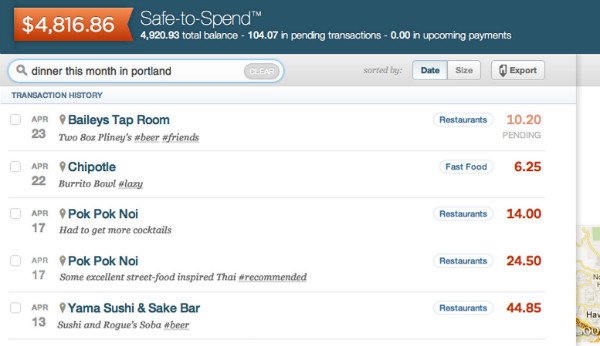
Alternative to Traditional Banking - Simple Online Interface

The difference lies in the experience. Simple removes bank tellers out of the equation. While many people probably never set foot inside their local banks already, they have the choice. Simple erases that choice and replaces it with an online and mobile experience that is more straightforward and, well, simple than most of what the competition has to offer. The service frees people from being tied to banks that may only serve certain regions.

The Experience

In the past couple of years, banks rolled out support for depositing checks by taking pictures of them using smartphones. This extra option for most banks is the norm for Simple. This limits people who can use the service to those who have a smartphone. Technically you can use an iPod to use the required mobile app instead, but that isn’t exactly opening the service up to more people.
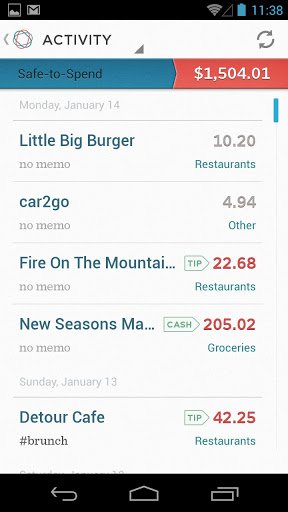
Alternative to Traditional Banking - Simple Mobile Android

Simple’s mobile and web apps offer a clean layout for managing money. Users can sign in to view their balances, pay bills, make budgets, and set goals. One nice feature is how Simple removes money set aside for goals from the balance available for spending, even though the money is still present in the account. While my current bank has this feature, my previous two didn’t. Simple opens up these tools to anyone living within the United States.
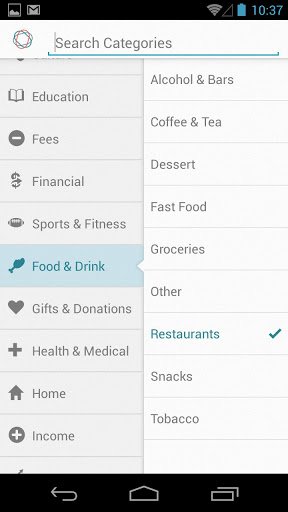
Simple Android Options

Users are given a Simple Visa Debit Card that can still be used wherever VISA cards are accepted. You won’t be given a checkbook, but you can still pay people using the web interface. Simple will write the check on your behalf, as long as it isn’t tax-related.

It is still possible to talk to a real-life person. While it won’t happen face-to-face, Simple does have help hotlines and online support available for those times when you just need answers. Quite frankly, much of the communication that goes on with bank tellers can take place over the phone anyway. It may be nice to put a friendly face on the person at the other end looking at your funds, it isn’t a fundamental necessity.

Conclusion

A sizable number of people still do all of their banking without ever signing into an online account, and Simple won’t get them to change their ways any time soon. For others, Simple offers what they like most about banking and gets rid of the cruft. It’s more evolutionary than revolutionary, but it’s still a breath of fresh air.

How to Access Blocked Websites From Overseas

Many popular websites are only available for specific countries. If you really need to access the content of the blocked websites, here are some methods you could try.

What is Bitcoin And How You Can Utilize It Online

Do you know that the Internet actually has its own currency. Since 2009, we can pay and get paid using Internet’s own currency – Bitcoin.

Track Time and Goals Using Progress Bar Timer [Google Chrome]

Tracking your time and task can be a difficult job. While some may have no trouble keeping track of time in their heads, others may benefit from a more visual means of measuring progress. Progress Bar Timer is a Google Chrome extension that turns deadlines and quotas into convenient progress bars to help track time and goals.

Can Tor Really Protect Your Online Privacy From The NSA (And Other Government Organizations)?

When the news that the NSA are keeping records of your phone calls and web data transfers broke out, people start to worry if they are really safe online and some of them switched to Tor to protect their privacy online. The question is, is Tor really safe? Does it really protect you from the NSA’s clutches?

Internet Censorship: How Countries Block Their Citizens from Entering Websites

Some countries carry out Internet censorship and block their citizens from entering websites. How do they do this? Here’s the answer.

Mastering Keyword Searches for Better Productivity in Firefox

Mozilla don’t call their address bar the “Awesome Bar” for nothing. Master the keyword searches in Firefox and turn the Awesome Bar into a productive tool.

5 Mistakes That Every WordPress User Should Avoid Making

As we focus all our attention to post great content, we tend to make some mistakes on WordPress that can be fatal. Here are top 5 mistakes that every WordPress user should avoid making.

Looking For a Secure Chat App? Try BitTorrent’s New P2P Messenger Bleep

Looking for an app to chat securely and privately with your friends? Try BitTorrent new P2P messenger Bleep that offers end-to-end encryption.

A New Exploit Is in Your Browser Right Now – How to Protect Yourself

Google has just discovered a POODLE exploit that can affect millions of browsers worldwide at this moment. Let’s see how you can protect yourself from POODLE exploit.

How to Get Rid of the Stickers in Comments on Facebook

Facebook added the sticker feature in its comments section. For those who dislike it, you can disable stickers in Facebook comments in Chrome and Firefox.

How Facebook Scammers Use Disasters to Make Money from You

Facebook scammers love to turn the misfortune of others into an opportunity to make a quick buck. Here are some of the techniques they use.

Why YouTube Added Support for 60 Frames Per Second

YouTube has added for videos to stream at 60 frames per second as opposed to its usual 30. Is this something we should be excited about?