If you are always browsing the web on your mobile phone, I am sure you have some website that you want to return to after a while. If you are using mobile Firefox in your Android devices, here is one neat trick that you can use to quickly access your browsing history.

While browsing the web, all you need to do is to tap and hold on the Back button. This will popup a window showing you the history of your previously accessed site. Scroll down the list and select the site you want to return to.
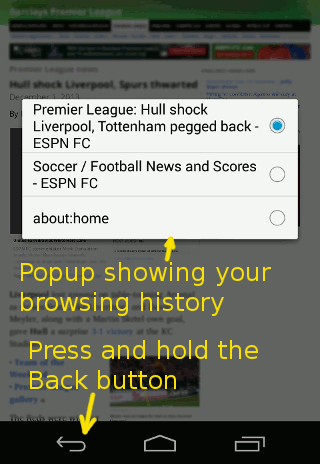
android-firefox-accessing-history

Another method that you can use is to tap on the URL bar. You can then tab on the “history” tab to reveal the list of site that you have previously accessed.
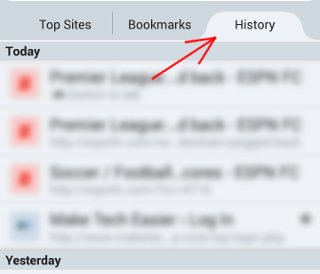
android-firefox-history-tab

Enjoy.

Note: Some third-party browsers, except for Chrome for Android, support this feature as well.

Image credit: Firefox for Android

Setup Your Own Self-Hosted Survey Application and Create Unlimited Survey Forms

While there are tons of tools and services that you use to create survey forms and conduct surveys, If you wish to have full control over your data, LimeSurvey is a good survey application that you can install on your own server and host your own surveys.

4 Popular Bitcoin Alternatives and How They Compare to Bitcoin

The cryptocurrencies is here to stay. Bitcoin may be receiving the most attention at the moment, but it is definitely not the only one around. There are tons of Bitcoin alternatives. Here we will take a look at the 4 popular Bitcoin alternatives and see how they compare to Bitcoin.

What Is “UTM_Source” And Should You Be Worried?

You may have seen URLs with a long string attached to the end of the link that looks something like this: “utm_source=facebook&utm_medium=fanpage&utm_campaign=new+article&wa_ibsrc=fanpage.” Should you be worried about the implications of this? We’ll have a look at what UTM is and answer any question you might have on this subject.

How to Quickly Close Multiple Tabs in Browser

There are times when you opened too many tabs in your browser and it is causing the whole system to slow down. A quick and easy way to fix this is to close as many unused tabs as possible to minimize the memory usage. However, it can be a chores if you have tons of opened tabs. Luckily, most browsers come with a way for you to quickly close multiple tabs with a single click.

How to Create QR Code in Google Drive

There are tons of ways to create QR code. If you are a Google Drive user, here is one quick way to create R code in Google Document

Clef: Log In to WordPress Without Any Password

Tired of typing your username and password everytime you want to login to a site? Clef is a password replacement app that allows you to login without password.

Using the New Microsoft Office App in Chrome

Following up to its revamp of the office web apps, Microsoft released a Chrome extension that allows you to use Office in Chrome browser. Let’s check it out.

Use History Eraser to Quickly Wipe Your History in Chrome

Are you worrying about your privacy when surfing the web? History Eraser can clean up your Chrome browsing history with a single click. Check it out here.

Force Google Chrome to Remember Username and Password for Particular Websites

Have you encountered websites where Google Chrome refuses to remember the login username and password? This extension can fix it.

Get Facebook Chat Heads in Google Chrome

Facebook chat heads is only available for Facebook Messenger app, but now you can use it in Google Chrome with the faces.im extension.

How to Transfer the Contents of User Profiles in Firefox

If you are trying out a new Firefox-based browser, you can transfer the content of your old user profiles so all your items are intact. Here’s how to do it.

How to Get Rid of the Stickers in Comments on Facebook

Facebook added the sticker feature in its comments section. For those who dislike it, you can disable stickers in Facebook comments in Chrome and Firefox.