Our Web browsers have a serious problem. Don’t get me wrong; they are becoming faster, more secure and stable with every update. However, there is one thing – actually, a couple of things, that are very wrong about them. The built-in tools, such as the bookmark manager, download manager, etc., haven’t really evolved a lot over the last few years. The good news is that web browsers allow you to easily install add-ons and extensions to enhance their capabilities. Here are some extensions you can use to replace the default functionalities of Chrome and Firefox to make them better browsers.

Add-on Manager
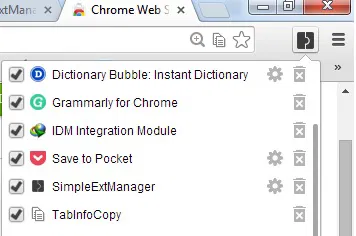
Making-browsers-better-SimpleExtManager

The default add-on manager for Chrome lists all the installed add-ons in the system and lets you install extensions manually. However, if you want more from the manager, you can try SimpleExtManager. The extension gives you quick access to enable/disable and uninstall add-ons via pop-ups. Furthermore, you can also disable the apps you don’t wish to see in Chrome. Firefox users can also try Cleanest Addon Manager.

New Tab Page

If you don’t like the default New Tab Page Chrome comes with, there are quite a handful of amazing alternatives that you can look into. Some of us at the site like Momentum, but if that doesn’t excite you, you can look into iOS 7 New Tab for Chrome or the whole collection of New Tab Page that we have showcased here.

Firefox users can change their browser’s New Tab Page, with New Tab Tools.

Tab Manager
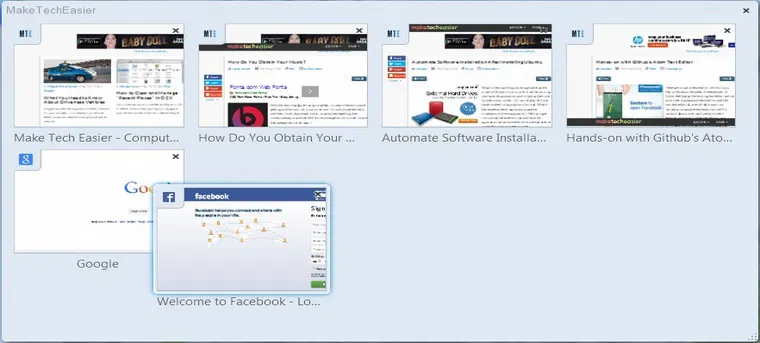
Enhancing-browsers-better-Tab-manager

At Firefox, we have something called Tab Manager (press Ctrl + Shift + E to open it) which lets you organize your tabs. While this works fine and looks great, there aren’t enough features that it offers. For that, we recommend you use the tab enhancing add-on, Tab Mix Plus. It brings several interesting features like duplicate tabs, windows and many more that Firefox doesn’t currently have. Chrome users can get the Fruumo Tab Manager.

Bookmark Manager
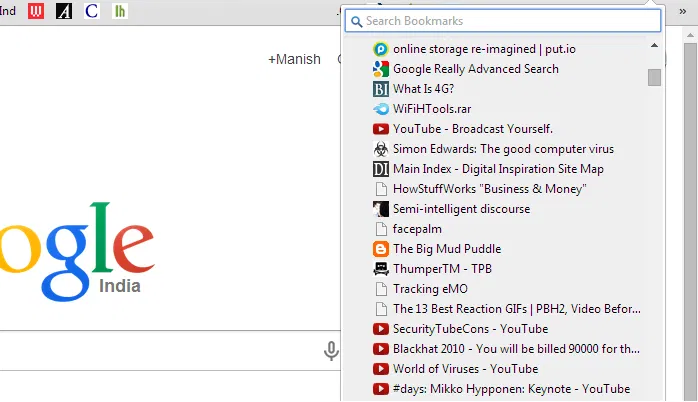
Enhancing-browsers-add-on-manager

There are a couple of things that you can do to make your entire collection of bookmarks easily accessible. One is placing all your favorite ones in the overhead (below the address bar). To accommodate more bookmarks, you can shorten the name of the bookmarks while saving or by editing. You can also make a bookmark of the bookmark manager, “chrome://bookmarks/#1” save it as a bookmark and place it overhead to gain one-click access to all the bookmarks.

bookmark manager

Alternatively, you can install Neater Bookmarks on Chrome. Firefox users can also install QuickMark.

Download Manager

When it comes to downloading files, both browsers lack several features. The resume capability doesn’t work as well, and the number of files that you can download in parallel with the speed factor seem displeasing. The good news is that both Chrome and Firefox support third party download managers. Chrome users can try the Chrono Download Manager, whereas Firefox users can be assured that there is no add-on that can help them download files better than DownloadThemAll.

Try these tools and let us know how they work for you. Do you have any other recommendations? We would love to hear from you.

Converting Files In Google Drive With DriveConverter

If you’re looking for a built-in tool to convert files in Google Drive, then try DriveConverter, a web app and Chrome extension specially built for Google Drive. It offers more flexible conversion features for documents, images and music files.

4 Reasons Why A Third Party DNS Server Is Better Than What Your ISP Gives You

You’ve probably heard of alternate DNS servers and how they could probably help you in some way or another. You may also wonder why you need to switch over. I’m going to give you some reasons why you probably should be using third party DNS server. You will end up wondering why you haven’t done it yet.

Speed Dial with Full Online Sync For Firefox

Even being a veteran browser, Firefox has not been able to implement the Speed Dial function well. That’s where FVD Speed Dial comes into play. This fully functional Firefox addon fundamentally changes the Speed Dial feature to what it should have been all along.

4 Things You Should Know About Digital Cryptocurrencies (Bitcoin, Litecoin, PPCoin, Etc.)

The Internet has entered a new era in which people can start trading in currencies that are not run by governments, called cryptocurrencies. If you have heard all the hype and wanted to get involved, it’s best that you find out more before investing in digital cryptocurrencies.

Add Events to Google Calendar From Anywhere in the Web

One of the biggest complaints about Google Calendar is that you can’t add events to Google Calendar without visiting the site. With Spot – Calendar’s Best Friend, you will be able to add events to Google Calendar, whenever you come across one anywhere in the Web.

How to Encrypt Your Gmail Message and Protect Your Privacy

If you are really concern about the privacy of your email, you should really consider encrypt your Gmail message so even Google can’t view it.

How to Easily Enable Real-time Collaboration on Your Site

If you are a webmaster, you might be thinking of how you can make your website more interactive, or even allowing your visitors to collaborate with one another. TogetherJS allows you to easily add a real-time collaboration feature to your site with minimal technical/coding skill.

How to Fix Foreign Characters Not Showing Up issue In WordPress

If you enter foreign character in WordPress, but only see question marks (???) showing up, here is the fix for this issue without losing any data.

Save and Restore Groups of Tabs in Chrome with This Quick Trick

Looking for a way to overcome having too many tabs open? Use this quick trick to save and restore groups of tabs in Chrome without installing an extension.

Don’t Like Gmail’s New Always Display External Images Feature? Here’s How to Disable It

By default, Google has decided to make it so that Gmail will always display external images in your email. If you don’t like this, here’s how to disable it.

K-Meleon – A Super Advanced Firefox Variant for Windows

K-Meleon is an advanced Firefox variant that wants to do everything by default. Is it suitable for you? Let check it out.

5 Chrome Apps to Maximize Your Productivity

There are many productivity apps that can help us become more efficient. The following apps make use of Google services and are particularly handy as Chrome apps. Check them out.