What do you usually do when a web page is inaccessible (ie. dead or broken)? You probably move on to another web page and never look back; I’m guilty of this myself. In some cases though, you may really want to see what’s on that page – by any means necessary.
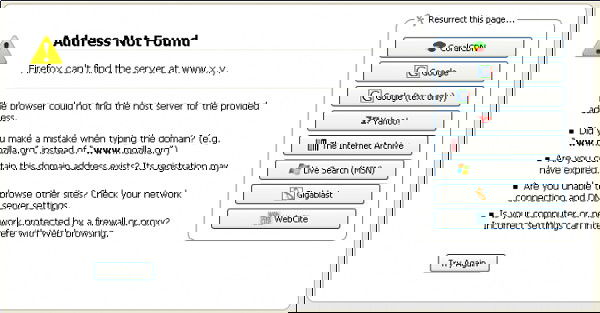
A sample web page with 'net error' message and Resurrect Pages integration.

This is where the Resurrect Pages add-on for Firefox comes into play; it does its best to make this happen for you. This add-on searches through five big cache/mirrors in order to find that specific web page. In many cases, it can resurrect dead web pages in a snap.

Once installed, if you come across a web page with a “net error” page, you’ll see options on the right side to resurrect it. However, you can also use the right-click context menu to resurrect a page, as well as to view the page at an earlier date (using The Internet Archive).

Resurrect Pages Add-on

Image Credit: CyboRoZ

You Will Surely Have A Corrupted WordPress Database Issue. Here Is How You Fix it

WordPress, like any other database driven application, is very prone to having the corrupted database issue. This article shows you how to recover from the issue and get your site back up working again.

Best Plugins to Automatically Watermark Images In WordPress

One of the way to protect your images online is to add watermark to your images. Here are some of the best plugins that you can use in WordPress to automatically add watermarks to the images you uploaded.

The Complete Guide to Avoid Scams on Craigslist

Craigslist is a popular place for people to buy and sell stuff. It is also a good hangout for fraudster to scam the user. This guide will teach you how to avoid scams on Craigslist.

How To Read ODT Documents Inside Your Browser

Various web services can open Microsoft Office files with ease, but what about files created with LibreOffice? The good thing is, you can also read ODT document in your browser as well.

How to Configure The Tabbed Inbox In Gmail

Google has recently introduced the new tabbed inbox in Gmail which will auto-sort your emails into various tabs and help you to be more productive. This new tabbed inbox interface is not activated by default. This article will show you how you can activate and configure the tabbed inbox in Gmail.

Identify the Fonts on Any Web Page [Chrome]

WhatFont is a Chrome extension that will identify the fonts used on any web page, just by hovering your mouse over them. No more web font guessing!

How to Organize History By Tags in Google Chrome

The History tool in Google Chrome can be in a mess sometimes. Better History provides a more structured way of searching and viewing recently visited sites.

Use Rublon to Add Automatic Two-Factor Authentication to WordPress

Rublon is a plugin that implements two factor authentication in WordPress, without you having to do the additional authentication step. Let see how it works.

Big List of Tools and Services to Help You Read Everything Faster

With the overwhelming information in the Internet, it has become necessary for us to read faster. Here are some tools to improve your reading speed.

Run LastPass Security Audit to Ensure Maximum Security

To make sure you have a secure password, LastPass comes with a security audit feature that allows you to know the strength of your overall passwords. Let check it out.

5 Mistakes That Every WordPress User Should Avoid Making

As we focus all our attention to post great content, we tend to make some mistakes on WordPress that can be fatal. Here are top 5 mistakes that every WordPress user should avoid making.

A New Exploit Is in Your Browser Right Now – How to Protect Yourself

Google has just discovered a POODLE exploit that can affect millions of browsers worldwide at this moment. Let’s see how you can protect yourself from POODLE exploit.