You’ve probably heard on the news something about ICANN and its “cozy relationship with the United States.” Some of you might not even know what ICANN is, and if you do, you might even vaguely conclude that it is a major Internet entity. Even if you know what it is, it’s helpful to understand how its relationship with the US will help you. Addressing all of these questions is important, particularly for our newer readers, as well as our most tech-savvy veterans.
What Is ICANN? (And a Little History)

The Internet Corporation for Assigned Names and Numbers (ICANN) is a non-profit private-sector entity based in Playa Vista, Los Angeles, California. This entity, as its name implies, assigns specific ranges of IP numbers to different regional registries (there are five) around the world. It basically gives you the identifier you use to connect to the Internet, whether directly or indirectly.
Aside from its IP assignments, it also controls the top-level domain (TLDs, i.e. “.com” and “.net”) space to some degree. Its most notable accomplishment is a project to internationalize the entire domain name system.
Prior to its existence, the management of the entire domain name system of the Internet was done by the US government. So, ICANN took this power out of the hands of the government, making the Internet a little less susceptible to state control. Notice the use of the words “a little” before “less.”
Does ICANN Have a Relationship with the US Government?
Yes. ICANN was actually created by a federal mandate. A document called the “Green Paper” created the corporation as a non-profit entity whose purpose was the privatization of the management of Internet names and addresses. This on-paper privatization, however, still doesn’t completely shield ICANN from state influence.
For example, the US Department of Commerce (DoC) has received the authority to gain oversight over some of ICANN’s operations due to a memorandum written by the corporation.
How Does This Relationship Affect You?
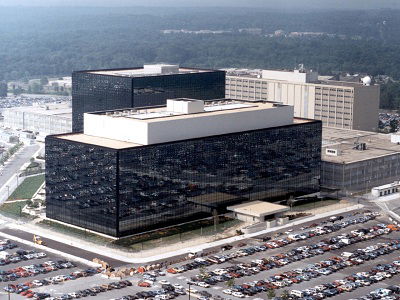
After the revelation by Edward Snowden about the National Security Agency (NSA) spying on foreign packet transmissions, it seems that the EU has grown a bit worried.
This isn’t a surprise, considering that each continent (and country) wants their Internet access to be completely sovereign and regulated (or unregulated) by their own standards. Considering the NSA’s actions, it seems as though foreign leaders worry about what else the United States government can do, including future involvement of ICANN in its projects.
To you personally, I don’t think you should worry too much unless you’re holding top-secret information about your country or a terrorist group. Also, ICANN isn’t your email provider. The worst that ICANN can do is assign you a new IP or take down a domain that you own (well, that last one’s pretty bad). Momentarily, though, I think you can rest at ease that your IP and DNS records are in check. Either way, these things are usually managed by your regional registry (ARIN for US, RIPE for Europe/Middle East/part of Asia, etc.).
Should ICANN Be Globalized?
Definitely! It can run like the UN: The building can be based on US soil continuously, but run as international territory. The system can be a stakeholder system, as EU Digital Agenda Commissioner Neelie Kroes proposes. And that’s that. It’s not a big overhaul, but it’s a good first step. We definitely don’t want to move the building to Antarctica.
It’s Your Turn To Talk
This is a hot-button issue in the tech world, so let’s hear your voice. What do you think we should do with ICANN? Leave us a comment below!