Typically, when a website experiences some downtime, its visitors just wait for it to come back and that’s the end of the story. There’s no news report, no major public panic, or any other incident. To most of the world, it’s just another day at the office. This all changed on January 27, 2015, when Facebook and Instagram were both mysteriously wiped from the face of the planet for 55 minutes. Suddenly, a very large number of people are curious about what large companies do to ensure that their websites stay up, and why websites sometimes go belly-up for a few hours. It’s time to speak about both of these things!
The Causes
Despite the stability behind the front-facing webpages of big names like Google, Facebook, Twitter, and YouTube, there are many things that can go wrong at any point in time. Even Google’s services, which are presumably the most stable on Earth, go down once in awhile (you can see statistics from the company itself here). For example, Gmail experienced a very brief outage that was barely noticed by anyone on December 18, 2014. Outages can happen for various reasons.
Let’s classify these reasons by “intentional” and “unintentional” outages. We’ll start with reasons for “intentional” outages:
- maintenance and implementation of new code
- permanent shutdown preceding the closing of a company
These were a bit obvious. But there are many more reasons for “unintentional” outages:
- server crash (this includes hard drive crashes and other hardware issues)
- domain name (DNS) expiration
- domain name seizure
- distributed denial of service (DDoS; see here for what this is)
- takedown by law enforcement
- server shut down by hacker (very rare)
- too many visitors accessing website simultaneously
- errors in database management or front-facing code
- natural disasters
- ISP issues on datacenter end
- DNS server outage
These are just some of the reasons a website can go down unintentionally, but they are the most common.
Is The Site Really Down?
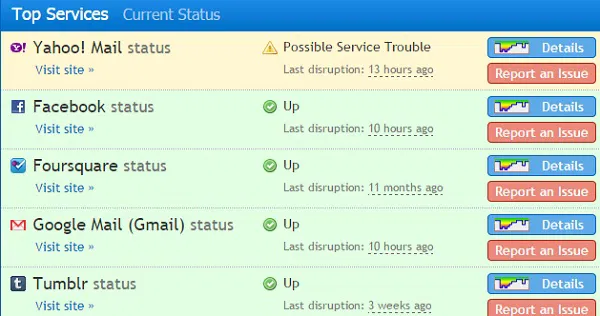
Before making a verdict on the status of a website, you should make sure there are no issues with your own connection. The best way to do this is to have a third party check if the site is running from their own connection. You can do this very simply by using services like “Is It Down Right Now?“. Both of these websites constantly show the statuses of the most popular destinations on the web for your convenience.
What Are They Doing About It?
The methodology behind solving an outage is typically very straightforward. Did the server crash? Turn it back on or fix it! Is someone attacking the site? Change its IP address and put it behind a reverse proxy firewall. We have the solutions. The thing is preventing the issue from coming up in the first place.
The most simple way to prevent these outages is to establish redundant hosting, tying one’s domain name to multiple IP addresses. When one IP fails, the next one is used. Look at Google’s setup:
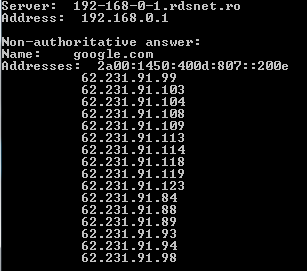
This simple solution is also effective against DDoS, which is perhaps the greatest external threat to any server. More than this, large companies like Google and Facebook do not put all their eggs in one basket; their services are hosted on different geographically-dispersed datacenters to ensure that widespread issues can be contained relatively quickly.
The only thing that this kind of hosting strategy doesn’t protect you against is law enforcement takedowns and domain seizures, in which case you’ll have to contact the authority that performed the seizure to see how you can work with them to restore your site.
Other methods for preventing downtime include buying a backup DNS service, hiring a caching service, and making subtle changes to the code that allow a website to function in a compartmentalized manner so that the homepage will always show even when things like the database or content distribution network (CDN) are down. These are just a few of the things that the websites we love do to ensure that they’ll never sink!
If you feel like adding your own thoughts to this, you’re more than welcome to leave a comment!