You see it all the time in news stories you click into from Facebook, your email inbox, and many other popular places where you hang out. It’s a long string attached to the end of the page’s address that looks something like this: utm_source=facebook&utm_medium=fanpage&utm_campaign=new+article&wa_ibsrc=fanpage. It seems to be popping up more frequently, and has been an annoyance for many. What’s it used for? Should you be worried about the implications of this? Is it a form of tracking? We’ll have a look at what UTM is and answer any question you might have on this subject.
What Is It?
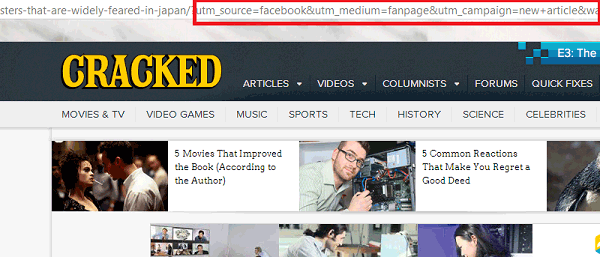
UTM stood for the Urchin Traffic Monitor, which was part of a software called “Urchin WebAnalytics Software” released in 1998. Google eventually purchased its technology in 2005 and sold the software for almost seven years until it was discontinued in March 28, 2012. Although it’s no longer selling, Google continues to use its URL conventions in its own analytics software to create campaigns, hence the “utm” in “utm_source” and many other variables. Simply put, the “utm” variables are tracking mechanisms that help companies gauge on how successful their campaigns are.
The Purpose of UTM Trackers
So, when a company is using UTM trackers (also abbreviated UTM, which is short for “Urchin Tracking Module”), you’ll click on a link that leads to a long address like the one I mentioned in the introduction. If you remove all the UTM variables, you still arrive at the same page. The only difference is that they won’t know where you’re coming from. Companies have to know whether the campaigns they invest time and money into are actually getting you to click on their links. It’s a way to help cut expenses where they’re not necessary and further experiment with ways of attracting new audiences.
The most common variables for UTM trackers are “source” and “medium.” The “utm_source” tells a company what site the link originally came from, and the “utm_medium” tells the company what original medium was used to send the link (i.e. referral, email, instant message, etc.).
Should You Be Worried?
UTM trackers are not to be mistaken with tracking cookies. They don’t track your activity all over the Internet. They simply show what campaign attracted you to click on a particular link. The danger level here is extremely low. While you might be wary of anything that tracks you, UTM trackers don’t download anything to your computer like tracking cookies do.
So, if you’re afraid of privacy infringement, there really is nothing to worry about with UTM trackers. They’re friendly pieces of code used for marketing purposes. The only thing that could worry you, though, is the fact that the link shows where you came from to get to the page it links to.
If you’re still worried and want to get rid of them, you can download a tracking token remover for either Mozilla Firefox or Google Chrome.
Conclusion
As long as you click links on websites that you trust, you should be fine. Even on websites you don’t trust, UTM trackers present no opportunity to harm you in any way. In fact, if you have a site, you might want to use these to determine what’s working out for you and what’s just wasting your time. If you have other thoughts on this, leave a comment below!