Chances are you reached this article because you’re concerned whether or not your Internet connection is really as fast as your service provider said it would be. There’s a lot of controversy going around about this, usually in the form of people who believe they may have been cheated by the company. While this might be the case, it never hurts to examine the most common causes of slower-than-advertised Internet speeds and determine whether one of these is happening to you so that you can determine how to remedy the situation.
1: Hardware Is Slowing You Down
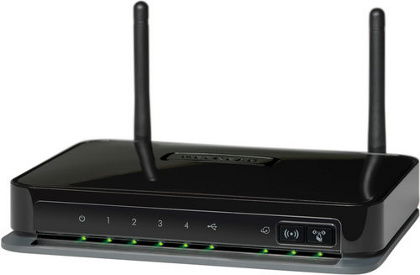
More than likely you’re probably using a router right now that you’ve possessed for a very long time. As routers age, they no longer correspond to the speeds that your service provider gives you. When the processor inside the router starts overheating, speeds get drastically slower. You’ll know this is happening to you if you get fast speeds after turning the router off for a few hours. But sometimes routers simply start failing without any other symptoms except a consistent slow speed. Call your ISP for a new router if they provided you with the one you have. If you can find a spare router, test your speed on it. Perhaps it’s time you considered getting new network hardware.
I, for one, use my computer as the primary router in my household. This is not possible in cases in which you have a DSL connection. It’s only available for people who use fiber-optic high-speed connections.
2: Congestion At Your Local ISP Router Hurts Your Speed
Your Internet service provider (ISP) has several routers set up along different neighborhoods. Your local router is shared with all of your neighbors. If too many of you are trying to download at high speeds all at the same time, you may experience slight cuts to your line’s performance. This is natural, and simply demonstrates that your ISP doesn’t have enough local routers to competently route all of your signals. In this case, you either gather up your neighbors and get them to join you in petitioning the company, or you simply switch over to an ISP that fewer people in your neighborhood are using. However, take note that problems probably aren’t just local.
3: The ISP Infrastructure Is Taking A Heavy Load, For Now

Depending on the time of day, your ISP may or may not be at full capacity. Each ISP has its own infrastructure. Sometimes this infrastructure gets overloaded with massive amounts of traffic. This is why ISPs perform so well in their humble beginnings and start to really drag in speed as they grow. Although signals are sent at the speed of light, they need to be queued, processed, and routed to their proper destinations. Depending on what region of the world you live in, the ISP may have trouble upgrading infrastructure because of government bureaucracy that gets in the way. This isn’t necessarily their fault. It’s just politics and money.
4: Throttling Pulled The Trigger On You

ISPs have been known to throttle people who use certain protocols and networks (particularly those on BitTorrent and other peer-to-peer networks). If you think you’re a victim of throttling, run a speed test first. If the speed on your line is ridiculously higher than your download speed, you’re probably being throttled. Keep in mind that there’s a difference between megabits per second and megabytes per second (1 mbyte = 8 mbits).
But there’s still one more problem related to this…
5: Your ISP Gives You Higher Speeds For National Downloads
Where I live there are many ISPs that offer 100 Mbit per second download speeds. Incredible, right? The problem is that this speed is the national speed. In other words, I would download at 100 Mbps only from someone in my own country. For downloads originating outside the country, ISPs may offer anywhere from 5 to 20 Mbps. That’s not nearly as much. To test this, go back to the speed test site I linked you to in the last section. Instead of selecting their recommendation, which is local, hop outside your country and select another one. This will test the efficacy of your line outside your local borders. If you see a drop in speed, this is most certainly your problem.
Thankfully, my ISP stopped throttling exterior downloads and uploads, giving me 100 Mbps uplink/downlink speeds everywhere. It’s a bit more expensive, but worth it!
Conclusion
Trust me. I’ve had a ton of frustrations over the years trying to figure out why my lines or the lines of my friends would drop in speed so suddenly. These usually were the reasons, and the solutions I proposed have been very helpful. If you have any other ideas, feel free to let ’em out in the comments section below!